
Introduction
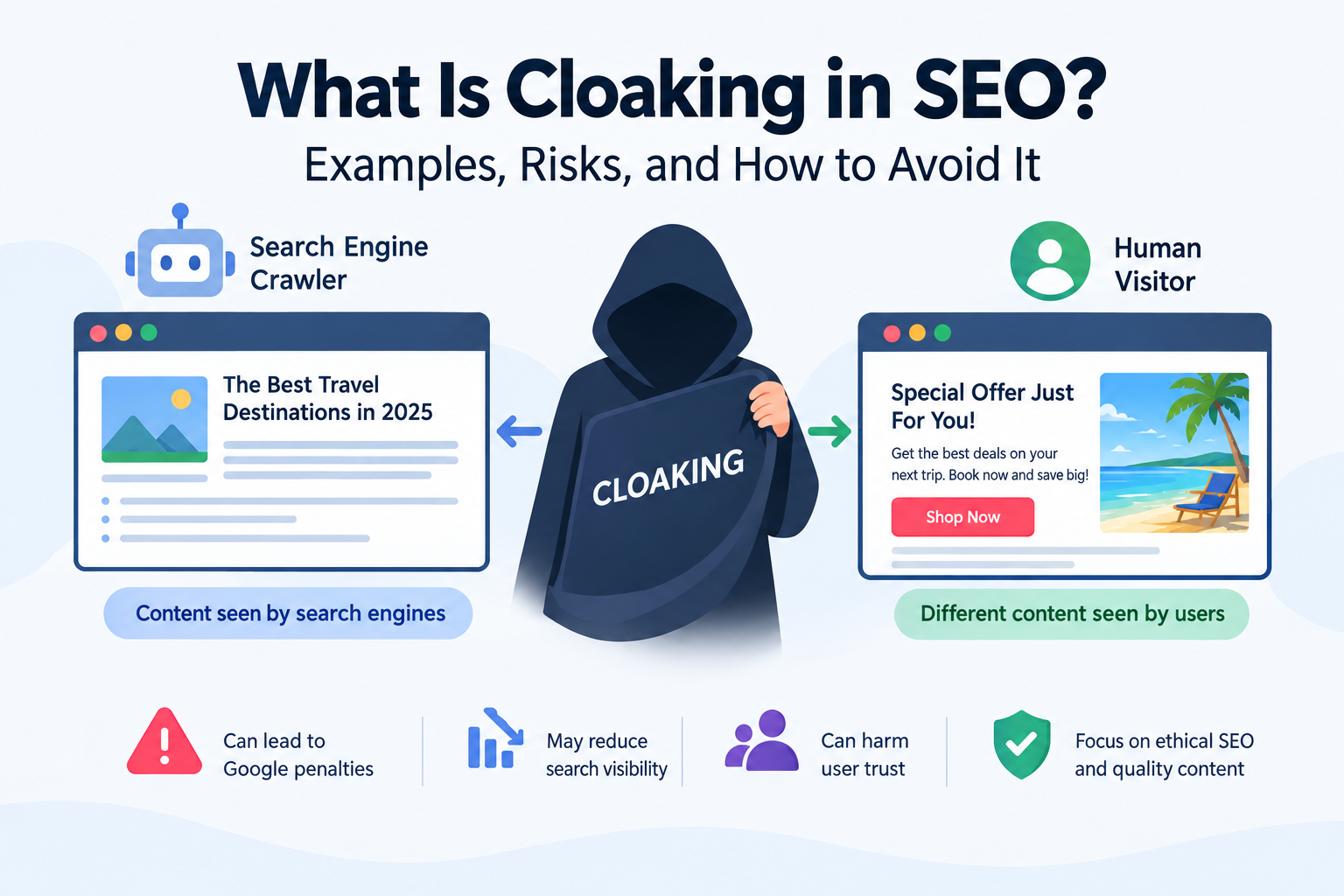
Cloaking in SEO is a technique in which a website deliberately shows different content to search engine crawlers and human visitors to manipulate search rankings. It can mislead search engines about what a page actually contains and create a poor experience for people who visit it.
For example, a website might show Googlebot a detailed article about travel destinations but display an unrelated promotional page to human visitors. This mismatch can violate Google’s spam policies.
Understanding what cloaking in SEO means is important for website owners, bloggers, digital marketers, and SEO professionals. Although websites can legitimately adapt their layouts and content for different devices, languages, or accessibility needs, deliberately misleading search engines is different.
If you are new to search engine optimization, start with our guide on what SEO is and how it works. It explains how search engines discover, understand, and rank website content.
What Is Cloaking in SEO?
Cloaking is a search engine spam practice that presents different content or URLs to search engines and users with the intention of manipulating rankings and misleading visitors.
Search engines use automated crawlers to discover and process web pages. A website engaging in cloaking may identify a search engine crawler and serve it content that differs substantially from the content shown to ordinary visitors.
For example, a website might show search engines a keyword-rich article about digital marketing but display unrelated advertisements to visitors. The search engine may interpret the page as relevant to one subject, while users experience something entirely different.
According to Google’s official spam policies, cloaking includes showing search engines one type of content while presenting users with different content to manipulate search rankings.
However, not every difference between a website’s versions is cloaking. Responsive layouts, translated pages, accessibility features, and other legitimate user experiences do not automatically violate Google’s policies.
The key issue is whether the website deliberately misleads search engines or users.
How Does Cloaking Work?
Cloaking generally involves a website determining what type of request it receives and then delivering different content based on that request.
A simplified explanation includes three steps:
- Request identification: The website checks technical information associated with a request, such as the user agent.
- Content selection: The website’s server or application determines which version of the page to return.
- Different presentation: Search engine crawlers receive one version, while human visitors receive another.
The technical methods can vary, but the defining issue is the deceptive intent behind the content differences.
Websites should not use these methods to misrepresent their pages to search engines. If your site uses JavaScript or other technologies that affect how content is rendered, follow Google’s recommendations for making the content accessible to both search engines and users.
Common Types of Cloaking in SEO
1. User-Agent Cloaking
User-agent cloaking occurs when a website uses the requesting browser or crawler’s user-agent information to decide which content to display.
For example, a website could show a search engine crawler an informative article while presenting visitors with an unrelated sales page.
Detecting a crawler is not automatically a violation. The concern is deliberately serving misleading content to influence search rankings.
2. IP-Based Cloaking
IP-based cloaking involves serving different content based on the IP address associated with a request.
For example, a website might identify requests believed to come from search engine crawlers and deliver content designed to influence rankings.
IP-based content delivery can also have legitimate uses, including regional services and security controls. It becomes problematic when used to deceive search engines about what visitors will see.
3. Hidden Text and Keyword Cloaking
Some websites hide keyword-heavy text from visitors while making it available to search engine crawlers. The hidden text may be unrelated to the visible content or added primarily to manipulate rankings.
Hidden text and cloaking are related but not identical concepts. Hidden-text spam involves concealing content from users, whereas cloaking involves presenting different content to users and search engines.
4. JavaScript-Based Cloaking
JavaScript-based cloaking involves using different rendering or content-delivery behavior to present search engines and visitors with substantially different versions of a page.
JavaScript itself is not cloaking. Many legitimate websites use JavaScript for navigation, interactive features, and dynamic content.
The issue arises when a website deliberately uses different versions to mislead search engines about what users will receive.
5. Image or Media Cloaking
Image cloaking can occur when a website serves search engines an image that differs from the image visitors see, or when the content presented in search results misrepresents the actual image.
For example, a page might appear to contain one product image in search results but show a different image when opened.
Differences in image presentation are not automatically violations. The concern is whether the website misleads search engines and users about the content.
Why Is Cloaking Against Google’s Guidelines?
Google aims to provide search results that accurately represent the pages users will visit. Cloaking undermines this goal by presenting search engines with misleading information about a page.
Google’s spam policies give examples such as showing search engines a page about travel destinations while displaying a page about unrelated products to visitors.
The policies also explain that legitimate content-gating and paywall arrangements are not automatically cloaking when Google can see the same full content that an authorized user can access and the relevant guidance is followed.
You can read the details in Google Search Central’s spam policies.
Businesses should focus on making their pages useful and accessible instead of trying to manipulate what search engines see. For more information about how search visibility supports business promotion, read our guide on what SEO means in marketing.
What Are the Risks of Cloaking in SEO?
Using cloaking to manipulate search results can expose a website to several risks.
1. Manual Actions
Google may issue a manual action when a website violates its spam policies. Depending on the issue, this can affect individual pages or a larger portion of the website’s presence in search results.
Website owners can check the Manual Actions report in Google Search Console to see whether Google has reported a manual action.
2. Reduced Search Visibility
Websites that violate Google’s spam policies may rank lower or stop appearing in search results. The outcome depends on the circumstances, and there is no single guaranteed penalty for every case.
3. Loss of User Trust
Visitors expect a page to deliver the information promised by its title and search snippet. If they encounter unrelated content instead, they may leave and become less likely to trust the business.
4. Additional Recovery Work
Resolving cloaking may require technical investigation, code changes, content checks, and ongoing monitoring. If Google has issued a manual action, the website owner needs to address the violation and follow the applicable review process.
For practical troubleshooting guidance, see Google’s Manual Actions report documentation.
How to Identify and Fix Cloaking on Your Website
Content differences can sometimes occur unintentionally because of caching, plugins, server configuration, scripts, or a compromised website. Investigate the cause before assuming the issue is deliberate.
Step 1: Compare the Page Seen by Users and Google
Use Google Search Console’s URL Inspection tool to examine how Google accesses a page. Compare the available rendered content with what a normal visitor sees.
Look for substantial, unexplained differences in the page’s text, links, images, redirects, and overall purpose.
Step 2: Review Redirects and Server Rules
Inspect server-side rules, redirects, caching configurations, and content-delivery settings. Confirm that they are not sending crawlers and visitors to misleadingly different destinations.
Step 3: Check Plugins and Scripts
Review recently installed plugins, themes, JavaScript, and third-party integrations. Unexpected content changes can sometimes result from misconfigured or compromised software.
If you suspect a security problem, investigate it promptly and follow your hosting provider’s security guidance.
Step 4: Make Content Accurate and Consistent
Ensure that search engines receive an accurate representation of the content available to users. Legitimate differences for accessibility, localization, or device layout can remain when they serve users rather than deceive search engines.
Step 5: Review Search Console Notifications
Check the Manual Actions and Security Issues reports in Google Search Console. If a manual action has been issued, correct the problem and follow Google’s instructions for requesting a review.
Google provides additional information in its guide to manual actions and recovery.
Cloaking vs. Legitimate Website Personalization
Not every change in website presentation is cloaking. Many websites adapt their experiences to meet different user needs.
Examples of legitimate variations include:
- Displaying a responsive layout on mobile and desktop devices.
- Providing translated pages for different language audiences.
- Adjusting font size or contrast for accessibility.
- Showing regional pricing, shipping information, or product availability.
- Personalizing interface settings according to user preferences.
These practices are not automatically cloaking when they provide a legitimate user experience and do not mislead search engines.
Website owners should be especially careful when running page experiments. Google’s A/B testing and website testing guidance explains why showing Googlebot one set of URLs and human visitors another can violate spam policies.
Better Alternatives to Cloaking
You can improve search visibility without using deceptive techniques.
Create useful content: Answer your audience’s questions with accurate, original information.
Improve page structure: Use descriptive headings, logical navigation, and relevant internal links.
Write accurate page titles: Make sure titles and descriptions reflect the content visitors will actually find.
Use descriptive URLs: Clear URLs help users understand the topic of a page. Learn more in our guide on what an SEO slug is.
Monitor website performance: Review indexing, organic visibility, and technical issues regularly. An organized SEO report can help you track important website metrics.
Follow search engine guidelines: Review official documentation before implementing technical SEO changes that affect how crawlers access or interpret your content.
For more practical SEO tutorials and digital marketing resources, visit Digital Soules.
Frequently Asked Questions
What is cloaking in SEO in simple words?
Cloaking is when a website deliberately shows search engines different content from what human visitors see, with the intention of manipulating rankings or misleading users.
Is cloaking illegal?
Cloaking is not automatically a criminal offence. However, deceptive cloaking can violate search engine policies and lead to reduced search visibility or other search-related consequences. Separate legal issues depend on the circumstances.
Does cloaking always result in a Google penalty?
Not every difference in content presentation results in a manual action. However, deceptive cloaking violates Google’s spam policies and can lead to ranking effects or a manual action.
Is showing different content on mobile and desktop cloaking?
No, not automatically. Responsive layouts and legitimate device-specific experiences are normal website practices. The concern is deliberately misleading search engines about the content users will receive.
Can cloaking be fixed?
Yes. Remove deceptive behavior, ensure that search engines and users receive an accurate representation of the page, and review Search Console for any related notifications. If a manual action exists, follow Google’s recovery guidance.
Conclusion
Cloaking in SEO involves deliberately presenting different content to search engine crawlers and human visitors to manipulate rankings or mislead users. Although legitimate websites can adapt their layouts and content for different audiences, deceptive cloaking violates Google’s spam policies and can put organic visibility at risk.
The better approach is to focus on useful content, sound technical SEO, descriptive URLs, and a positive user experience. These practices provide a more sustainable foundation for improving search visibility.
For more practical SEO guides and digital marketing insights, explore Digital Soules and continue building your website’s organic growth strategy.



