OpenAI’s ChatGPT Dots are always-on AI agents powered by GPT-6 Astra, announced at DevDay on September 29, 2026. Each Dot has a cloud computer and browser for managing projects, researching topics, preparing documents, and completing tasks across apps. OpenAI’s plugin ecosystem connects to over 4,000 apps, while memory helps a Dot carry context between conversations. You can personalize its appearance, reach it through ChatGPT, Slack, Teams, or voice, and set rules for approvals. Dots can work toward your goals 24/7, subject to permissions, usage limits, and decisions that need you. Access is rolling out to eligible Pro, Business Premium, and Enterprise users, with desktop setup and supported mobile-app follow-up. This guide covers features, setup, everyday use, pricing, privacy, advantages, and limitations. It also compares Grok Bot and Meta Muse, and explores OpenAI’s future plans. OpenAI’s Dots announcement
Updated October 1, 2026. This guide draws on product documentation and launch reporting. Suggested workflows are examples, not hands-on test results.
What is ChatGPT Dots, and what does the update change?
A Dot gives you a continuing point of contact for work that develops over time. You can explain a responsibility, provide sources, and return later with new information without rebuilding the entire brief.
For example, summarizing a meeting produces one result. Following the resulting project also involves tracking decisions, checking unfinished work, and flagging delays. The same distinction applies to content and software.
You might ask for one social post, or assign ongoing drafts whenever an approved interview arrives. You could ask about a bug, or assign the investigation and preparation of a proposed fix. In each case, the responsibility extends beyond the first response.
OpenAI presented Dots among its DevDay announcements on September 29, 2026. The event’s opening keynote featured Sam Altman. DevDay recap, official event schedule
The launch also fits a wider move toward persistent AI coworkers. Reuters describes this competition around agents that can complete work across business tools.
That doesn’t mean Dots invented background work. Grok Bot and Meta Muse also offer persistent agents, so the useful comparison concerns their workflows and controls.
How a Dot differs from an AI model
GPT-6 Astra is the model behind Dots. A Dot combines that model’s capabilities with memory, tools, permissions, and a work environment.
The model helps reason and generate outputs. The agent uses those capabilities to pursue a task through connected tools.
ChatGPT is where you can discuss that work. Connected apps provide access to specific information or actions, such as documents, calendars, or code.
This distinction explains why model benchmarks cannot tell you everything about an agent. Its usefulness also depends on access, task completion, approval handling, and cost. OpenAI’s Dots overview
How the always-on Dot agent works
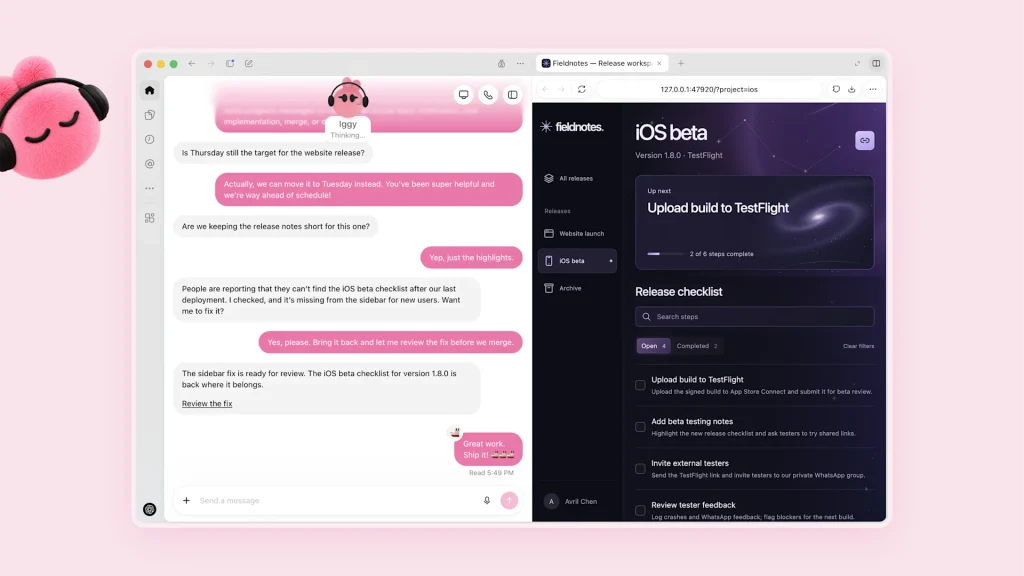
Each Dot has its own cloud computer and browser. Cloud tasks can continue while your laptop is off, provided they don’t require your local device. Your computer stays separate until you connect it. That connection allows work with local files, code, and apps within the permissions you grant.
The cloud browser also has separate sign-in sessions. Being logged into a website on your laptop doesn’t automatically log your Dot into that website. Computers and apps documentation
OpenAI says its plugin ecosystem can connect Dots to over 4,000 apps. Access still depends on the plugins you enable, connected accounts, supported actions, and permissions. The app count describes the ecosystem; it doesn’t mean your Dot automatically has access to thousands of services.
Once assigned work, a Dot can track progress, follow up, and use background agents while you continue talking. It can also delegate tasks to ChatGPT Work or Codex.
Relevant ChatGPT memory, conversations, and saved notes help preserve your preferences and decisions. Correct mistaken assumptions directly, especially when priorities or deadlines change. Tasks and memory
OpenAI also describes proactive research, where a Dot reviews connected information to identify useful next steps. Those research tools are read-only; taking follow-up action requires the applicable authorization.
One launch example involved an early tester who had forgotten to invoice a publication. OpenAI says the Dot prepared the invoice and sent it after approval.
The practical distinction is between identifying useful work and receiving permission to act. Background research alone doesn’t authorize sending messages or changing accounts. OpenAI’s safety explanation
Staying in contact and personalizing your Dot
You can reach the same Dot through ChatGPT, Slack, Microsoft Teams, and supported voice calls. Changing channels doesn’t create a new agent or reset its context.
Messages stay within their respective channels, although relevant context can carry across them. Tell your Dot where to send routine results and where to raise urgent decisions.
In ChatGPT, the phone button starts a call. Work you assigned can continue after that call ends. Messaging documentation
You can also change your Dot’s name, shape, color, eyes, glasses, and accessories. These settings make it easier to recognize the agent you work with.
A new Dot starts with a handle such as @yourname-dot. Naming it updates the handle; OpenAI gives @tibo-alfred as an example for a Dot named Alfred. Dot customization
ChatGPT Dots availability, plans, and pricing
Dots began rolling out on September 29, 2026. Having an eligible subscription doesn’t necessarily mean the feature appears immediately.
The access guide lists Pro 100, Pro 200, and Pro 500. These plans qualify for eligible adults outside the EEA, UK, and Switzerland. Business Premium is rolling out worldwide.
Enterprise rollout also requires an administrator to enable access. Free, Go, and Plus aren’t listed as eligible in the current guide. Availability and access
OpenAI lists Pro subscriptions at $100, $200, and $500 USD per month. These are plan prices, rather than separate charges for a Dot. Current ChatGPT pricing
Your first Dot is included with eligible Pro or Business Premium plans at no additional charge. Deeper work has an allowance, with extended limits during the first month after launch.
Conversations with your Dot don’t count toward ChatGPT conversation limits. Tasks delegated to Work or Codex use those products’ allowances as usual. Dots usage information
Always-on availability therefore doesn’t mean unlimited task execution. Before upgrading, check regional eligibility, the allowance for your workload, and any separate connected-service charges.
How to set up and use ChatGPT Dots
Start in a desktop browser or the ChatGPT desktop app. Initial creation happens on desktop; supported mobile-app access follows afterward.
For browser setup, open Dots in ChatGPT and sign in to your eligible account. Then follow this process:
- Create your primary Dot and follow its introduction.
- Connect the apps required for your first task, or add them later.
- Choose a name and personalize its appearance.
- Describe the responsibility and provide the relevant sources.
- Set boundaries for actions it can take and decisions requiring approval.
- Review the first result and correct missing details.
You don’t need coding skills for this setup. Plain-language instructions are enough to begin, although technical work still needs suitable review. OpenAI’s getting-started guide
Using the browser for real tasks
Your browser is the interface where you talk to the Dot. Its cloud browser is the separate environment where it can perform web tasks.
When a site requires authentication, use the supported private sign-in request or take over the browser yourself. Return control after completing the required step.
Some websites block cloud browsers or request additional verification. A clear prompt cannot remove those access requirements. Browser and sign-in guidance
Begin with a familiar document and ask for a short project summary. Check names, dates, sources, and omitted actions before assigning more complex work.
Using the desktop app and local files
Open or create your Dot in the ChatGPT desktop app. Cloud work doesn’t require access to your personal computer.
When a task needs local resources, open the Dot’s profile. Under Computers, choose Your computer, select Allow access, and confirm the connection.
Keep the device online with ChatGPT open during local work. OpenAI currently documents support for one connected personal computer at a time. Local computer access
This explains when your laptop can be switched off. Independent cloud work can continue, while tasks using your laptop need it to remain available.
Open Activity in the Dot’s profile to inspect delegated tasks. Review their outputs and respond when they require a decision, permission, or missing source. Managing delegated work
Continuing on mobile, Slack, or Teams
After desktop setup, you can continue in the mobile app when the supporting update is available. Mobile web isn’t supported in the current documentation.
Slack and Teams provide additional ways to communicate. Adding a Dot to a Slack channel doesn’t automatically start monitoring it.
Specify what it should watch, when it should respond, and who may receive information. Messaging access is separate from access to other apps and your computer. Contact methods and mobile access
Giving your Dot a responsibility it can follow
Good delegation starts with a clear outcome. Include the source material, required output, deadline, approval rules, and conditions for contacting you.
For marketing work, a defined SEO content strategy helps connect each task to an audience and publishing goal. A broad instruction such as “handle my marketing” leaves those decisions unclear.
Here is an original brief you can adapt:
Keep our weekly content plan current using the campaign brief and approved interview transcripts. Prepare an article summary, social captions, and a list of claims needing verification.
Save drafts in the folder I specify. Do not publish, email, or change live pages.
Ask me about missing facts. Notify me when drafts are ready or a deadline is at risk.
Replace the general source names with actual files or connected locations. Ask the Dot to repeat its understanding before it begins.
For recurring work, add the timing and an end date:
Check the approved project folder each weekday at 9 AM in my stated time zone. Continue for the next two weeks.
Notify me only about new material, blocked work, or decisions requiring approval. Confirm the schedule and where you will save results.
Review the first result before extending the assignment. The purpose of this first run is to find misunderstandings while the task is still small.
Practical use cases for bloggers, teams, and businesses
Content production is a useful starting point because you can compare drafts with known source material. A Dot can turn approved interviews into show notes, clip ideas, and social captions. You still review quotations, facts, tone, and publication permissions. For podcast projects, our podcast submission sites guide covers distribution options after the content is ready.
Product teams can assign updates to launch drafts when features or dates change. Human reviewers should check the approved scope and any promises made to customers.
Sales teams can compare customer requirements with product documents and identify unanswered questions. Pricing, commitments, and technical claims remain points for review.
Researchers can revisit analysis as new measurements arrive. They still need to assess the methods, calculations, and conclusions.
Developers can investigate customer feedback and prepare proposed fixes. Tests, code review, and release decisions determine whether those changes are ready to use.
Business teams can refresh reporting materials from connected information. Review the source data, definitions, and totals before sharing the result.
These scenarios reflect OpenAI’s published Dots examples. The review steps explain how you might assess the work; they aren’t claims about tested performance.
A practical first workflow for a blogger
Choose an existing article you know well and supply a small set of newer primary sources. Ask the Dot to identify claims that may need updating.
Request four fields for every suggested change: the existing claim, new evidence, source link, and proposed correction. Keep the published page unchanged during this review.
Check whether the proposed edits preserve each source’s meaning. Separate confirmed facts from forecasts, and reject corrections that lack evidence.
Record the changes you needed to make before assigning the workflow again. This creates a useful measure of editorial effort.
Our AI SEO services guide explains the distinction between using AI for SEO and improving visibility in AI answers. Treat content assistance and search visibility as separate outcomes to evaluate.
How Dots compares with ChatGPT Agent, Work, and Codex
OpenAI already offered tools that could take actions. The earlier ChatGPT Agent demonstrated computer-based task execution, although OpenAI now marks that launch announcement as outdated.
Dots adds an ongoing relationship around responsibilities. It can coordinate work while giving you a place to change priorities and provide feedback. Original ChatGPT Agent announcement
| Product or mode | Practical role |
|---|---|
| Regular ChatGPT conversation | Discuss questions, explore ideas, and work through individual requests |
| Earlier ChatGPT Agent | Execute requested tasks using computer-based tools |
| ChatGPT Work | Complete work involving files, tools, and connected environments |
| Codex | Handle software and coding tasks |
| Dots | Coordinate ongoing responsibilities and delegate work when useful |
These roles overlap, especially across Work and Codex. The distinction helps you choose a starting point; it isn’t a strict boundary around every capability. ChatGPT product guide
A normal conversation may be enough for a single question. A Dot may be more useful when a project changes repeatedly and requires follow-through.
That potential benefit concerns continuity. It doesn’t establish that every answer from a Dot will be better.
ChatGPT Dots vs Grok Bot vs Meta Muse
Dots, Grok Bot, and Meta Muse all describe background work, memory, and external tools. Their differences concern product design, connections, access, and how people supervise work.
Muse is Meta’s agent application, while Muse Spark is the model behind it. Comparing Muse with Dots therefore means comparing agent products.
| Feature | ChatGPT Dots | Grok Bot | Meta Muse |
|---|---|---|---|
| Main emphasis | Personal delegation across ChatGPT, Work, and Codex | Multiple AI coworkers and team workflows | Personal assistance and small-business tasks |
| Work environment | A Dot’s cloud computer, with optional local access | A user’s Bots share a cloud computer | Cloud environment and browser, with optional Mac access |
| Interfaces | ChatGPT, Slack, Teams, and voice | macOS, Windows, and iOS | Web, mobile apps, Mac app, and WhatsApp |
| Connections | ChatGPT plugins and permitted sources | Plugins, skills, and Cursor-compatible tools | Meta business accounts and business connectors |
| Action controls | Permissions, Custom Rules, and Auto-review | Rules and a separate action reviewer | Permissions and a separate Sentinel reviewer |
| Access | Eligible paid plans and regional rollout | Eligible Grok, Cursor, and Enterprise plans | Free and paid options; US and Canada in the latest announcement |
This comparison uses OpenAI’s documentation, xAI’s Grok Bot materials, and Meta’s Muse launch, business, security, and support documentation. It describes documented features as of October 1, 2026.
Grok’s shared computer means a user’s Bots share files, browser sessions, and logins. Consider that shared access when assigning separate specialist roles.
xAI lists eligible Cursor Pro at $20 per month and SuperGrok at $30 per month. Included weekly Bot usage and additional charges apply.
Meta lists limited free Muse usage, Power at $20 per month, and Maximum at $100 per month. Check your account’s billing terms and allowances before comparing those prices.
A lower subscription price doesn’t necessarily mean a lower cost for your workload. Compare the amount of work included and the charges after that allowance.
Dots deserves consideration when you already rely on ChatGPT, Work, or Codex. Grok Bot’s Team Bots offering may suit workflows involving several specialist coworkers.
Muse may fit personal assistance and Meta-connected business work. Meta’s September 29 announcement lists availability in the US and Canada.
No controlled testing in this guide establishes an overall winner. Give each candidate the same files, task, deadline, and approval rules, then compare finished output, corrections, and total usage.
ChatGPT Dots pros, cons, and privacy controls
The main potential benefit is continuity. A Dot can retain relevant context, coordinate follow-ups, and keep cloud work moving between conversations. That may reduce repeated explanations and routine coordination. Connected tools can also help carry a task across several services.
The trade-off is the time needed to define access and review results. Wrong assumptions can carry forward until corrected, and tasks may stop for missing permissions or decisions.
Cloud work also differs from local work. A disconnected laptop can interrupt a task that depends on its files or apps.
OpenAI says Dots can still make mistakes. Review work affecting customers, money, accounts, or published information, even when safeguards are enabled. Dots safety documentation
Choosing permissions and approval rules
Custom Rules let you allow specified actions, require approval, or block them. Auto-review checks consequential actions against those rules, your instructions, and safety requirements.
Permission to draft an email doesn’t automatically authorize sending it. Some sensitive steps, including changing passwords, remain with you. Controls and approvals
Review existing app connections before assigning work. Plugin permissions can be shared across Dots, ChatGPT, Work, and Codex.
A newly created Dot therefore shouldn’t be assumed to have no access to previously authorized services. Connecting a messaging channel is also different from granting access to app data or local files. Privacy and permissions FAQ
How training settings apply
OpenAI says Business, Enterprise, and Edu workspace content isn’t used for model training by default. Personal-plan data controls apply to eligible conversations and work.
OpenAI doesn’t train directly on proactive research or a Dot’s private notes. If that information enters an eligible conversation or task, your training settings apply. Dots data-use FAQ
Pausing and stopping work
Pausing your Dot stops its current main task. Delegated tasks and future scheduled runs require separate attention.
Stop delegated work in Activity and cancel recurring work in Scheduled. Revoke a connection if you also want to remove access.
Stopping a task doesn’t reverse actions already completed. Check both ongoing work and scheduled runs when ending a responsibility. Managing and stopping Dots
Common problems when setting up Dots
If Dots isn’t visible, check your plan, region, rollout status, and workspace settings. Enterprise users may need their administrator to enable it. For mobile setup problems, create the Dot through desktop web or the desktop app first. Then check whether the supporting mobile update has arrived. Setup and access guidance
If local files aren’t available, check the computer connection and device status. ChatGPT must remain open for local work. For a website task that stops, look for a sign-in request, verification step, or cloud-browser restriction. These are different from a problem with your task instructions. Computer and browser guidance
If your Dot responds in Slack but doesn’t watch for updates, confirm that you explicitly assigned monitoring. Specify the channel and events it should track. Slack and Teams guidance
If work remains unfinished, inspect pending approvals and missing sources. Your Dot may need a decision before it can continue.
What could come next for ChatGPT Dots?
OpenAI plans to expand access and allow additional personal Dots. It has also described future options for increasing speed or monthly work capacity.
Specialist organizational Dots are being explored through focused enterprise pilots. These agents would have defined responsibilities, their own identities, and access managed by the organization.
Microsoft Agent 365 integration is under development. These announcements describe direction rather than a universal release date or a fully available feature set. OpenAI’s announced roadmap
Texting is listed as coming soon, while Dot-initiated calls are planned after launch. Check current availability before depending on either capability. Messaging roadmap
Dealroom’s summary of the DevDay interview discusses the broader challenge of turning AI capability into useful delegation. The practical test will be whether agents finish work reliably with manageable supervision.
My assessment is that predictable costs, clear approvals, and fewer corrections will matter most. That is an interpretation, not an announced OpenAI commitment.
Choose based on capabilities your account can use today. A small task with familiar sources is the best starting point for evaluating the results.