
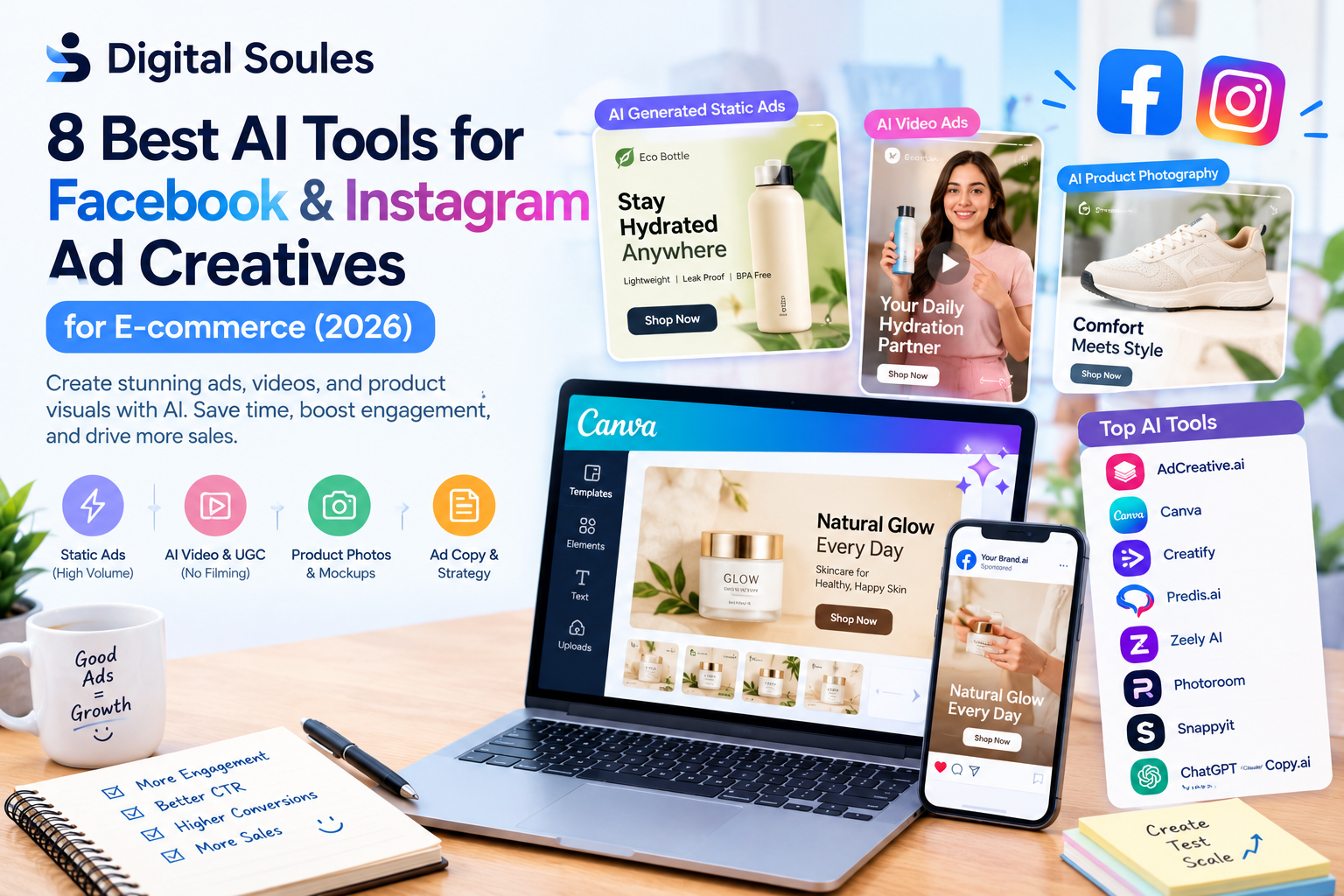
AI tools for Facebook and Instagram ad creatives are software applications that use artificial intelligence to help businesses produce advertising images, videos, product photos, headlines, captions, and promotional concepts.
For e-commerce brands, these tools can turn existing product information into several creative assets without requiring a separate designer, copywriter, video editor, and photographer for every campaign.
For example, imagine you sell skincare products through Shopify. You already have a product page, a few product photos, and customer reviews. An AI tool can help you transform those materials into:
- Static Facebook ads featuring your product and key benefits.
- Instagram Story and Reel advertisements.
- UGC-style videos featuring AI-generated presenters.
- Product images with studio or lifestyle backgrounds.
- Different headlines and calls to action for testing.
- Multiple creative variations for different customer segments.
However, generating an ad and generating a profitable ad are two different things. AI can accelerate creative production, but actual performance still depends on your offer, audience, product quality, landing page, campaign setup, and testing.
Why Are E-commerce Brands Using AI for Facebook and Instagram Ads?
E-commerce advertising requires a steady supply of creative content. A single product may need several images, video concepts, promotional angles, and formats to support a campaign.
AI helps reduce the amount of repetitive work involved.
1. Create More Ad Variations
Instead of designing one advertisement and using it for weeks, marketers can create multiple variations with different headlines, images, offers, and messaging.
For example, a clothing store could test ads focused on comfort, style, durability, affordability, and seasonal fashion.
These variations give the advertiser more creative concepts to evaluate.
2. Reduce Product Photography Costs
Professional product photography can require photographers, models, locations, lighting equipment, and post-production.
AI product photography tools can help transform existing product photos into studio-style images, lifestyle scenes, and additional visual variations.
They are particularly useful for stores with many products or limited creative budgets. However, generated images should be checked carefully to ensure they accurately represent the real product.
3. Produce Video Ads Without Filming Every Time
Video advertisements can demonstrate how a product works, explain its benefits, or present a customer-style product introduction.
AI video tools can generate scripts, voiceovers, avatars, and scenes from product information or uploaded images.
This can help smaller brands experiment with video advertising without arranging a traditional shoot for every concept.
4. Test Different Advertising Messages
Sometimes the visual is not the main problem. The advertisement may simply focus on the wrong customer benefit.
AI writing tools can help generate different hooks, headlines, primary text, and calls to action.
For example, an advertisement for a portable blender could focus on convenience, healthy routines, easy cleaning, or travel-friendly design. The advertiser can then test which message resonates with the intended audience.
5. Adapt Creatives for Different Placements
Facebook and Instagram support different ad placements, including Feed, Stories, and Reels. These placements do not all use the same aspect ratio or visual layout.
AI-assisted design tools can help resize and adapt creatives for different formats. Nevertheless, each version should be reviewed to make sure important product details, text, and calls to action remain visible.
8 Best AI Tools for Facebook and Instagram Ad Creatives
1. AdCreative.ai Best for High-Volume Static Ads
Best for: E-commerce stores, advertising agencies, and performance marketers that need numerous image-ad variations.
AdCreative.ai is designed to help marketers generate advertising creatives at scale. It can help produce visual ad concepts and variations that businesses can review before launching campaigns.
For an e-commerce brand running frequent promotions, creating enough fresh creatives can become a significant workload. AdCreative.ai aims to simplify this process by helping marketers generate multiple concepts from their product and campaign information.
Key features
- AI-generated static advertising creatives.
- Multiple visual variations for campaign testing.
- Advertising headlines and copy assistance.
- Creative scoring features.
- Support for different marketing and advertising workflows.
One of its notable features is Creative Scoring AI. According to its documentation, the platform evaluates creatives using a range of data points and provides performance and awareness scores. These scores are predictions, not guarantees of actual advertising results. Read the official creative scoring documentation.
How can e-commerce brands use AdCreative.ai?
Imagine you operate an online store selling fitness accessories. You want to promote resistance bands but do not know which visual concept will work best.
You could develop several directions:
- A product-focused image showing the resistance bands.
- A lifestyle creative showing someone exercising at home.
- A benefit-led creative focused on convenient home workouts.
- A promotional creative featuring a genuine discount.
- A comparison-style creative explaining the product’s features.
AdCreative.ai can help accelerate the production of these concepts so you can review them and select suitable variations for testing.
Pros
- Useful for generating numerous ad concepts.
- Can reduce repetitive creative-production work.
- Creative scoring can help prioritize which variations to review.
- Suitable for businesses running frequent campaigns.
Limitations
AI-generated scores should not replace actual campaign data. A creative that receives a promising predicted score may still perform poorly with your audience. Review the product representation, copy, layout, and offer before publishing.
Our verdict: AdCreative.ai is a strong option to evaluate when your main challenge is producing a high volume of static advertising creatives.
2. Canva Magic Studio Best for Brand-Controlled Ad Design
Best for: Small businesses, e-commerce founders, and marketers who want to combine AI assistance with hands-on design control.
Canva is a popular design platform with templates, image editing, and AI-assisted features under its Magic Studio offerings. It is useful when you want to create advertisements that match your brand rather than relying entirely on automatically generated designs.
For an online store, consistent branding matters. Customers should be able to recognize your products through your colors, typography, imagery, and overall visual style.
Canva makes it easier to build reusable designs and adapt them for different promotional campaigns.
Key features
- AI-assisted design and content creation.
- Customizable social media ad templates.
- Image editing and background tools.
- Brand assets and design consistency through Brand Kit features.
- Resizing and adapting designs for different formats.
- Manual control over typography, layout, colors, and product placement.
Feature availability can depend on your Canva plan.
How can e-commerce brands use Canva?
Suppose you sell clothing, cosmetics, or home accessories. You could create a reusable advertising template containing your logo, brand colors, product image, offer, and call to action.
For a new campaign, replace the product photo, update the offer, and adjust the headline.
You can also create different versions for Feed, Stories, and Reels, where appropriate, rather than forcing one layout into every placement.
Pros
- Good balance of AI assistance and manual control.
- Useful for maintaining a consistent brand identity.
- Suitable for static ads, promotional graphics, and social media content.
- Accessible to users without advanced graphic-design skills.
Limitations
Canva is a flexible design platform rather than a fully automated advertising-performance system. You may still need to develop the creative concept, check the copy, and create several variations manually.
Our verdict: Choose Canva Magic Studio if you want affordable, flexible creative production and need to maintain control over your brand’s appearance.
3. Creatify Best for AI Video and UGC-Style Ads
Best for: E-commerce brands that want product videos, AI presenters, and short-form advertising content without filming every concept.
Creatify specializes in AI-powered video advertising. One of its useful workflows lets you provide a product URL so the platform can analyze product information and generate a video-ad concept.
It also supports workflows involving uploaded product assets and AI-assisted scripting.
This is useful for brands that have product pages and photos but lack the resources to produce frequent video advertisements.
Key features
- Product URL-to-video workflows.
- AI-generated advertising scripts.
- AI avatar and UGC-style video options.
- Different creative styles, including polished and creator-inspired formats.
- Multiple video variations.
- Editing and refinement through conversational instructions.
Creatify’s documentation explains how its URL-to-video feature uses product information to generate customized video creatives. Read the official guide.
How can e-commerce brands use Creatify?
Imagine you sell a rechargeable mini vacuum cleaner.
You could provide the product page and generate a video concept that introduces the product, demonstrates its intended use, and explains its main benefits.
You might then develop different versions:
- A problem-and-solution video.
- A product demonstration.
- A short feature overview.
- A creator-style product introduction.
- A promotional video for a genuine sale.
Each version can focus on a different customer motivation.
Pros
- Useful for creating video ads without repeated filming.
- Can turn existing product information into video concepts.
- Supports creative iteration and different video styles.
- Suitable for brands that need a regular supply of short-form content.
Limitations
AI avatars and voices may not feel authentic for every brand or audience. Review pronunciation, product demonstrations, scripts, and visual accuracy before publishing. Do not present a fictional AI character as a genuine customer or claim that the person has personally used the product.
Our verdict: Creatify is worth considering when video production is your biggest bottleneck and you want to develop multiple product-ad concepts efficiently.
4. Predis.ai Best for Creating Image Ads, Videos, and Social Content
Best for: Small e-commerce businesses that want to produce several types of social advertising content from one platform.
Predis.ai offers AI-assisted creation for image ads, video ads, UGC-style content, and other social media assets. You can start with a product link, a text prompt, or an image and use the platform to develop advertising concepts.
This makes it useful for businesses that need more than static graphics but do not want to manage a separate tool for every type of creative.
Key features
- AI image-ad generation.
- Short-form video creation.
- UGC-style advertising concepts.
- AI-generated hooks and voiceovers.
- Product-focused creative generation.
- Social content and campaign ideation.
Predis.ai advertises a free-start option and a limited trial period; check the current offer and usage limits before relying on it for an ongoing workflow. Visit the official website.
How can e-commerce brands use Predis.ai?
Suppose you run an online store selling kitchen accessories. You want to promote a compact food chopper.
You could begin with a product image and develop a short video showing the product’s intended use. You could also create static ads highlighting convenience, time savings, and ease of storage.
For a promotional campaign, you could prepare several headline and visual combinations, then choose the strongest candidates for testing.
Pros
- Supports both image and video workflows.
- Useful for generating social media content from product information.
- Can help reduce the number of separate tools required.
- Suitable for small marketing teams.
Limitations
The quality of the output depends on the input information, creative direction, and editing. Review the final advertisement for brand consistency, product accuracy, and readability.
Our verdict: Predis.ai is a practical option if you need a mix of static ads, short videos, and other social media creatives in one workflow.
5. Zeely AI Best for Generating Ads From Product URLs
Best for: Small e-commerce businesses that want to move quickly from a product page to ready-to-review advertising creatives.
Zeely AI provides tools for generating static ads, video ads, UGC-style content, headlines, and calls to action. Its workflow can begin with a product URL, helping the system gather available product details and images.
This can be especially useful for store owners who have a functioning product page but lack the time or design experience to create every ad manually.
Key features
- Static ad generation from product links.
- AI-assisted ad copy and headlines.
- Video and UGC-style creative generation.
- AI avatars and voiceovers.
- Multiple creative variations.
- Brand information and styling options.
- Workflows for preparing and launching ads across supported platforms.
Zeely’s official product pages describe generating static, video, and UGC-style ads, including variations for Meta placements. Explore the AI ad generator.
How can e-commerce brands use Zeely AI?
Suppose your store sells a skincare serum. You can provide the product URL and use the available information to generate an ad concept.
You might create one static image focused on the product, a second creative that highlights a genuine product feature, and a short video with an AI presenter explaining the product’s intended use.
The important step is to review the results carefully. Product claims, ingredient information, discounts, and customer benefits should match what your business can substantiate.
Pros
- Designed for relatively fast creative production.
- Supports static and video formats.
- Can work from product links or manually entered product information.
- Useful for businesses that need multiple variations.
Limitations
Automatically generated content still requires human review. Check subscription allowances, editing options, export formats, and any campaign-publishing capabilities before committing.
Our verdict: Zeely AI is a good tool to evaluate if you want a streamlined workflow from product information to multiple advertising concepts.
6. Photoroom Best for E-commerce Product Photography
Best for: Online stores that need professional-looking product images, clean backgrounds, and lifestyle visuals.
Photoroom is an AI-powered image-editing and product-photography platform. Rather than focusing primarily on ad copy or campaign strategy, it helps businesses improve the visual assets used in their advertisements and product listings.
A simple product photograph can be transformed into a cleaner, more polished visual with background removal, AI-generated backgrounds, product staging, and other editing features.
Photoroom also supports batch workflows, which can be valuable when a store has a large product catalog. Explore its e-commerce product photography features.
Key features
- Background removal and replacement.
- AI-generated product backgrounds.
- Product staging and lifestyle scenes.
- Product image enhancement.
- Image resizing for different channels.
- Batch editing and image automation.
- Brand consistency features.
How can e-commerce brands use Photoroom?
Imagine you sell handbags. You have basic product photographs taken against a plain wall, but you want more attractive visuals for Instagram and Facebook.
Photoroom can help you remove the original background and place the product into a suitable studio-style or lifestyle scene.
You could create several concepts, such as a minimalist studio image, a seasonal promotional background, or a lifestyle composition designed to fit the product’s positioning.
For best results, make sure the generated image preserves the actual bag’s shape, color, materials, hardware, and other important details.
Pros
- Strong focus on product imagery.
- Useful for creating consistent visual assets across a catalog.
- Can reduce repetitive background-editing work.
- Helpful for static ads and product-focused creatives.
Limitations
Photoroom is not a complete replacement for an ad-copy generator or video-ad platform. It is primarily useful for the visual-production side of your advertising workflow. Some advanced features require paid access or AI credits.
Our verdict: Photoroom is a strong choice when your existing product photos need improvement before they are ready for paid social campaigns.
7. Snappyit Best for Fashion Product Images and Virtual Models
Best for: Clothing brands, apparel stores, and fashion e-commerce sellers.
Fashion brands often need more than a plain product photograph. They may need flat-lay images, ghost-mannequin views, virtual-model photographs, and lifestyle imagery that helps customers understand how clothing looks when worn.
Snappyit focuses on AI-assisted product photography, particularly for fashion and apparel workflows.
Its listed capabilities include ghost-mannequin images and AI fashion-model or virtual try-on-style product visuals. Explore Snappyit’s product photography resources.
Key features
- AI-generated fashion-model imagery.
- Ghost-mannequin-style product views.
- Flat-lay product visuals.
- Apparel-focused image transformations.
- Product image variations for online catalogs and marketing.
How can e-commerce brands use Snappyit?
Suppose you run an online clothing store and have photographs of a T-shirt on a flat surface.
You could use Snappyit to create additional presentation styles, including a virtual model wearing the garment or a clean product image for an advertising creative.
These assets can then be incorporated into a Facebook or Instagram campaign.
For fashion advertising, accuracy is especially important. Inspect garment color, fit, pattern, logos, stitching, and fabric details. A visually appealing image is not useful if it misrepresents what customers will receive.
Pros
- Focused on fashion and apparel photography.
- Can reduce the need to arrange a new model shoot for every variation.
- Useful for creating additional product-image formats.
- Can help smaller fashion brands produce more varied catalog visuals.
Limitations
Its fashion-focused workflow may be unnecessary for stores selling unrelated product categories. Review the generated images carefully to ensure the clothing remains faithful to the actual item.
Our verdict: Snappyit is worth exploring if your store sells clothing or fashion accessories and needs more visual variety for product ads.
8. ChatGPT, Claude, and Copy.ai Best for Ad Copy and Creative Strategy
Best for: E-commerce marketers who need better hooks, headlines, product messaging, video scripts, and testing ideas.
Websites: ChatGPT, Claude, Copy.ai
Not every advertising problem requires another image generator. Sometimes, the most useful improvement is a better message.
ChatGPT, Claude, and Copy.ai can help you develop advertising concepts, write different versions of primary text, brainstorm hooks, and turn product information into structured creative briefs. Copy.ai also offers tools for generating advertising and sales copy. Explore its sales copy generator.
ChatGPT can also help with campaign planning, copy variations, creative brainstorming, and image generation. See OpenAI’s marketing guidance.
Key features and use cases
- Facebook ad primary text.
- Instagram captions and headlines.
- Video hooks and scripts.
- Customer pain-point research based on supplied information.
- Product-benefit messaging.
- Calls to action.
- Creative testing matrices.
- Image-generation prompts and visual concepts.
How can e-commerce brands use these tools?
Suppose you sell a reusable water bottle. Instead of asking AI to “write a Facebook ad,” provide the product’s actual features, target audience, price, offer, and customer objections.
Then ask for several different angles:
- Convenience for daily use.
- Reusability and practical value.
- A gift idea for a particular occasion.
- A product demonstration.
- A promotion featuring a genuine discount.
You can request multiple hooks and primary-text versions for each angle. This creates a more structured starting point for your campaign.
Example prompt for Facebook ad copy
“Act as an e-commerce direct-response copywriter. Create five Facebook ad concepts for the product described below. For each concept, provide a short opening hook, primary text, headline, and call to action. Use clear, natural language. Focus each concept on a different customer benefit. Do not invent product features, customer testimonials, performance statistics, or guarantees.
Product: [Product name]
Target audience: [Audience]
Verified features: [List of features]
Price and offer: [Actual price and promotion]
Main customer problem: [Problem]
Brand voice: [Brand voice]”
This prompt encourages different concepts while keeping the copy tied to real product information.
Pros
- Flexible for many product categories.
- Useful for producing numerous copy variations.
- Can help turn customer research into creative concepts.
- Supports brainstorming before image or video production.
- Can be paired with dedicated design and video tools.
Limitations
AI-generated copy may sound generic or include unsupported claims if you provide insufficient context. Review every claim, confirm product details, and edit the final message to match your brand.
Our verdict: ChatGPT, Claude, and Copy.ai are useful creative partners when you need stronger messaging and more testing ideas. They work particularly well alongside an image or video creation tool.
Which AI Tool Is Best for Facebook Ads?
There is no single best tool for every e-commerce business. The right choice depends on what you need to produce and how much control you want over the final result.
| Requirement | Tool to consider | Main reason |
|---|---|---|
| Hundreds of static creative concepts | AdCreative.ai | Creative generation and scoring features |
| Consistent brand design | Canva Magic Studio | Templates and hands-on editing |
| AI video ads from product pages | Creatify | Product URL-to-video workflow |
| Images and videos in one workflow | Predis.ai | Multiple social creative formats |
| Product-link-to-ad workflow | Zeely AI | Static and video ad generation |
| Better product backgrounds | Photoroom | E-commerce image editing |
| Apparel and virtual-model imagery | Snappyit | Fashion-focused product photography |
| Headlines, hooks, and scripts | ChatGPT, Claude, or Copy.ai | Flexible copy and concept development |
For a small e-commerce store, Canva and ChatGPT may be a sensible starting combination. If you need more automated video production, evaluate Creatify or Predis.ai. If your store has hundreds of product images, Photoroom may be more valuable than a general ad generator.
Which AI Tool Is Best for E-commerce?
The best tool depends on your product category and the type of creative assets you need.
For clothing and fashion
Consider Snappyit for apparel imagery and Canva for turning those visuals into finished advertising designs.
For skincare and beauty
Consider Photoroom for product photography and Creatify or Predis.ai for video-ad concepts. Review all product claims carefully, especially claims about results or ingredients.
For electronics and gadgets
Consider Creatify for demonstrations and product-explainer videos, alongside AdCreative.ai or Canva for static ads.
For home and kitchen products
Photoroom can help create cleaner product imagery, while Creatify can help develop short demonstrations that show the product in use.
For large product catalogs
Look at tools with batch editing, reusable brand settings, and repeatable generation workflows. Photoroom is particularly relevant for image-heavy catalogs, while AdCreative.ai may suit teams that need to create numerous advertising concepts.
Can AI Automatically Generate Facebook Ads for E-commerce Products?
Yes. Several tools can generate advertising assets from a product URL, an uploaded image, or a written description.
A typical workflow looks like this:
- Provide the product URL or upload product images.
- Let the tool extract or use the supplied product information.
- Choose the desired format, such as a static image or video.
- Generate headlines, creative concepts, or scripts.
- Review and edit the outputs.
- Export or publish through the available workflow.
- Test the creative in Meta Ads Manager and evaluate real campaign results.
Tools such as Creatify and Zeely describe product-link-based creative workflows, while Predis.ai supports ad generation from links, prompts, and images.
Important: Automated creative generation does not mean an advertisement is automatically approved by Meta or guaranteed to perform well. You remain responsible for the claims, visuals, landing page, targeting, and compliance of the campaign.
Can You Create Facebook Ads Using AI for Free?
Yes, you can often start with free access, limited features, or trial allowances. However, free availability varies by product and can change over time.
Here is a practical way to get started without paying for several tools immediately.
Option 1: Use ChatGPT for Ad Copy and Concepts
Start by providing accurate product information and asking for several distinct advertising angles, hooks, headlines, and calls to action.
ChatGPT can also help you plan visual concepts and generate images, subject to the features and usage limits available to your account.
Option 2: Try Canva’s Available Free Features
Canva provides a free entry point for design work, although some templates, AI features, and brand tools may require a paid plan.
Use it to arrange product images, create promotional layouts, and prepare different ad formats.
Option 3: Explore Limited Trials
Some dedicated AI advertising platforms offer trials or limited introductory access. Check the current terms for AdCreative.ai, Creatify, Predis.ai, and other tools before starting a project.
Pay attention to generation credits, watermarks, export quality, and the number of assets included.
Option 4: Start With Existing Product Photos
You do not always need to generate an entirely new image. A good product photograph, clear offer, and well-written headline can provide a useful starting point.
Use an available image editor to remove distractions, improve the background, and create a few different layouts.
The goal is to validate your creative direction before spending money on multiple subscriptions.
How to Create Better Facebook and Instagram Ad Creatives With AI
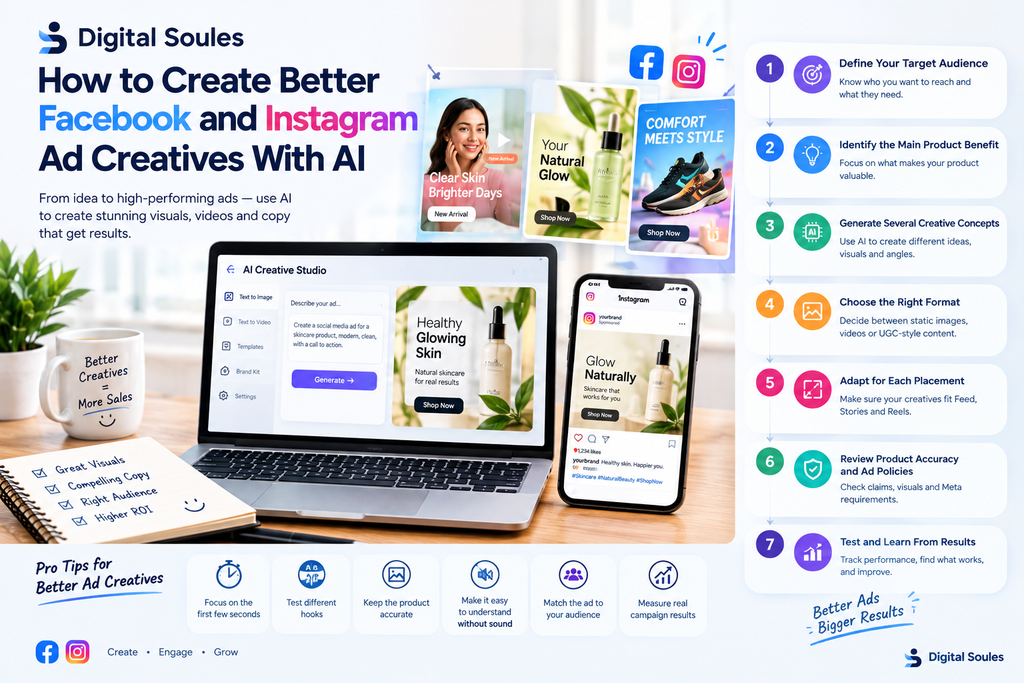
Choosing a tool is only the first step. The workflow you use has a major impact on the usefulness of the final ads.
Step 1: Define Your Target Audience
Before generating creatives, clarify who you want to reach.
For example, a store selling ergonomic office accessories might target remote workers, office professionals, or people looking to improve their desk setup.
The audience influences the product benefits, language, imagery, and offer that make sense for the campaign.
Step 2: Identify the Main Product Benefit
Choose a benefit that is accurate and relevant to the customer.
For a travel backpack, possible angles could include storage organization, comfort, durability, or convenience. Use only claims that match the actual product.
Avoid asking AI to invent benefits or make unsupported promises.
Step 3: Generate Several Creative Concepts
Do not ask an AI tool for ten copies of the same advertisement. Ask for genuinely different concepts.
For example:
- Product close-up.
- Lifestyle scene.
- Problem-and-solution concept.
- Feature demonstration.
- Customer question and answer.
- Seasonal offer.
- Product comparison based on verified features.
Different concepts provide more useful testing opportunities than minor changes to colors or wording alone.
Step 4: Choose the Right Format
Static images are useful for simple product presentations, offers, and feature highlights.
Videos can demonstrate how a product works or tell a short story. UGC-style creative can provide a more conversational presentation, although AI-generated presenters should not be represented as real customers.
Choose formats that suit the product, audience, and campaign objective.
Step 5: Adapt the Creative for Each Placement
Prepare suitable versions for Facebook and Instagram Feed, Stories, and Reels.
Check the current specifications in Meta’s advertising tools before exporting. In general, square and portrait formats are useful for feed-oriented placements, while vertical 9:16 creative is commonly used for full-screen Stories and Reels.
Make sure key product details, text, logos, and calls to action are not obscured by interface elements.
Step 6: Review Product Accuracy and Ad Policies
Before publishing, check:
- Product shape, color, packaging, and other important details.
- Price, discount, shipping, and availability information.
- Accuracy of all product claims.
- Readability on mobile devices.
- Landing-page consistency.
- Relevant Meta advertising requirements and disclosure rules.
Meta has described its approach to labeling certain AI-generated and digitally altered media. Requirements can vary by content and context, so consult current platform guidance for your campaign. Read Meta’s AI-content labeling guidance.
Step 7: Test and Learn From Actual Results
Once your ads are live, use campaign data to decide what to improve.
Useful metrics may include:
- Click-through rate (CTR).
- Cost per click (CPC).
- Cost per purchase.
- Conversion rate.
- Return on ad spend (ROAS).
- Revenue and profit after advertising costs.
A high click-through rate does not automatically mean a profitable campaign. An advertisement may attract clicks without generating purchases, so evaluate the full path from creative to checkout.
Keep records of the concept, audience, offer, format, and results. Over time, this can help you identify which creative approaches are worth developing further.
Common Mistakes to Avoid When Using AI for E-commerce Ads
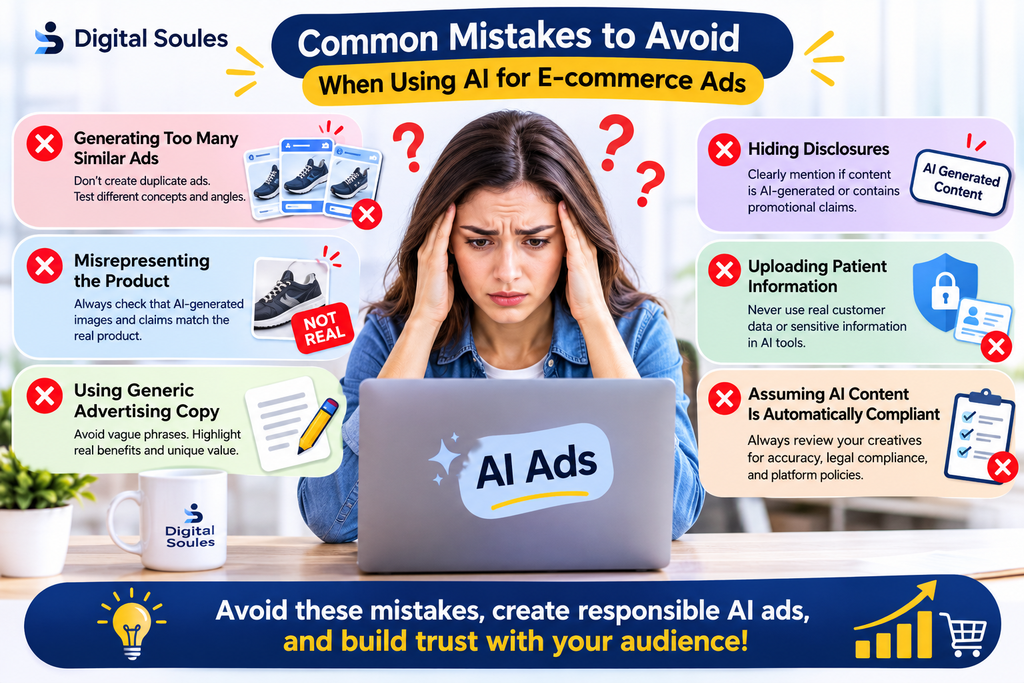
Generating Too Many Similar Ads
A large number of variations is not useful if every ad communicates the same message. Test different customer motivations and creative concepts.
Misrepresenting the Product
AI can alter colors, packaging, proportions, materials, or product features. Check the output against the actual item before publishing.
Using Generic Advertising Copy
Phrases such as “the ultimate solution” or “revolutionary quality” often lack useful detail. Provide specific product information and explain why the product matters to the intended audience.
Treating Predicted Scores as Real Results
Creative scoring systems can help prioritize concepts, but actual performance depends on the campaign and audience. Use live results to evaluate your ads.
Ignoring the Landing Page
An attractive ad cannot fix a confusing product page, unclear pricing, slow checkout, or missing product information. Keep the message consistent from the ad to the landing page.
Publishing Without Review
AI tools can produce factual errors, awkward wording, unrealistic images, and unsupported claims. A human review should remain part of the production process.
Frequently Asked Questions
Which AI tool is best for Facebook ads?
AdCreative.ai is worth considering for high-volume static creative production, Canva Magic Studio for brand-controlled design, and Creatify for AI video ads. ChatGPT, Claude, and Copy.ai are useful for writing ad copy and developing creative concepts. The best option depends on your format, budget, and workflow.
Which AI tool is best for e-commerce?
Photoroom is a strong option for product photography and image editing. Snappyit is worth exploring for apparel visuals. Creatify, Predis.ai, and Zeely AI can help produce video or mixed-format advertising creatives, while AdCreative.ai focuses on high-volume ad generation.
Are there AI tools that automatically generate Facebook ads from e-commerce products?
Yes. Creatify and Zeely AI offer workflows that use product URLs or supplied assets to generate ad concepts. Predis.ai can also create ads from product links, prompts, or images. Review the generated content and verify the current publishing features before choosing a platform.
Can I use AI for Facebook ads?
Yes. You can use AI to develop concepts, write ad copy, create images, edit product photos, and produce videos. You must still ensure that the content accurately represents your product and complies with applicable advertising rules and Meta policies.
What is the best AI for ads?
There is no universal winner. AdCreative.ai is suited to static creative volume, Canva to flexible design, Creatify to video generation, Photoroom to product images, and ChatGPT or Copy.ai to copywriting. Choose based on the specific task you want to improve.
Can I create Facebook ads using AI for free?
You can start with free tools, limited free features, or trial allowances. ChatGPT and Canva offer ways to begin creating content, although some features and usage limits depend on the plan. Check the current terms of dedicated ad-generation tools before relying on a free trial for ongoing campaigns.
Do AI-generated ads guarantee better sales?
No. AI can make creative production faster and help you explore more concepts, but it cannot guarantee clicks, conversions, or profitability. Results also depend on your product, offer, audience, landing page, pricing, and campaign management.
Should I use AI-generated UGC ads?
AI-generated UGC-style ads can be useful for testing different presentations without filming every version. However, do not falsely present an AI avatar as a genuine customer or invent personal experiences, reviews, or testimonials. Keep the content transparent and accurate.
Conclusion
AI tools are changing how e-commerce businesses create Facebook and Instagram advertising creatives. They can help brands produce static ads, short videos, product images, promotional concepts, and copy variations with less repetitive work.
For high-volume static ads, consider AdCreative.ai. For flexible design and brand control, Canva Magic Studio is a useful option. Creatify, Predis.ai, and Zeely AI are worth exploring for video and multi-format creative production. Photoroom can help improve product photography, while Snappyit is particularly relevant to fashion stores. ChatGPT, Claude, and Copy.ai can support ad copy and creative strategy.
You do not need to subscribe to every platform. Start with the tool that addresses your biggest production bottleneck, create a small set of genuinely different concepts, and test them using real campaign data.
At Digital Soules, we believe the most useful role of AI in advertising is to help marketers spend less time on repetitive production and more time understanding customers, improving creative ideas, and making better decisions.



