
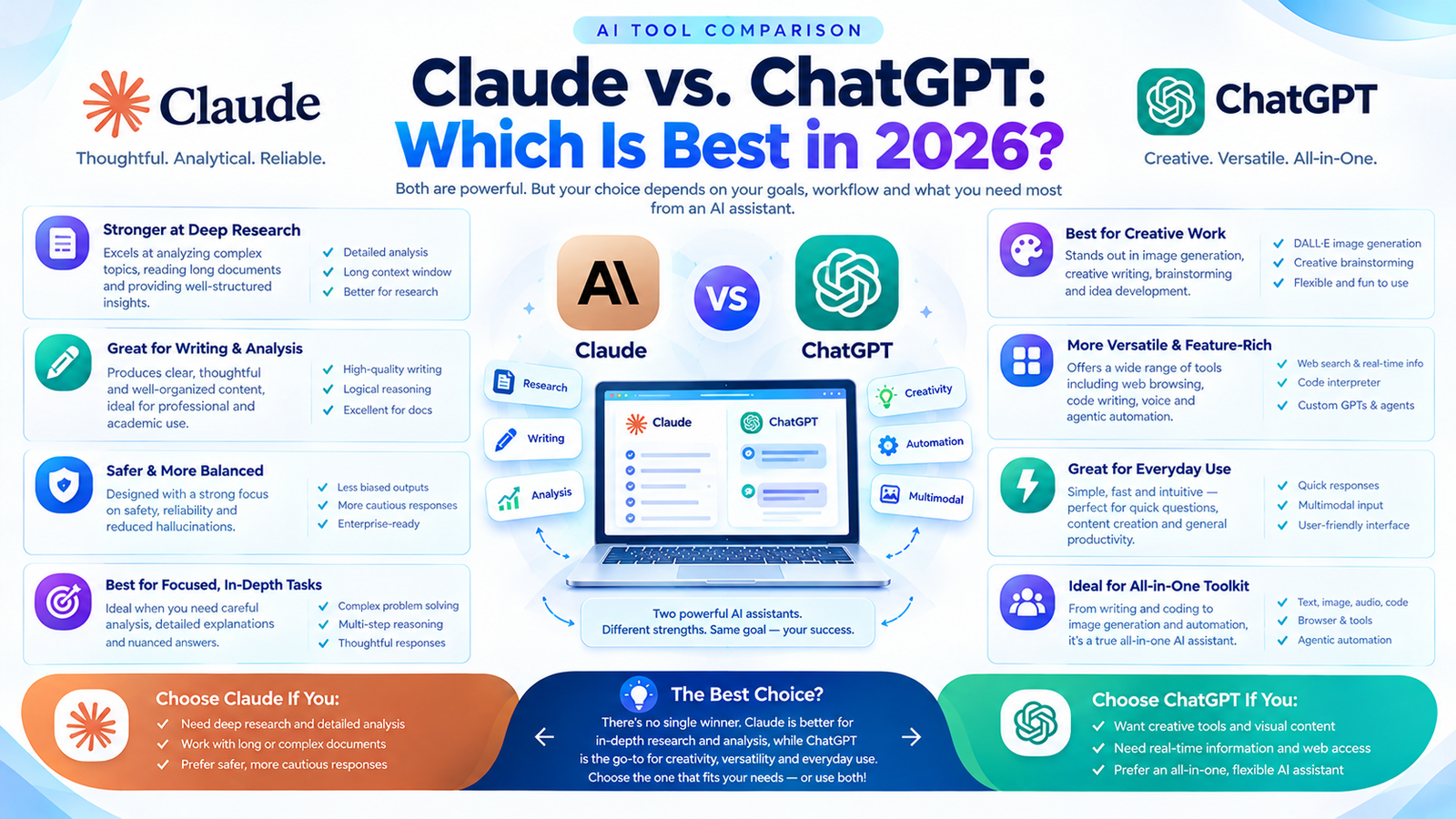
Artificial intelligence has changed how people write, research, code, analyze information, and complete everyday business tasks. Among the most popular AI assistants, Claude and ChatGPT stand out for their ability to support everything from content creation to software development.
However, choosing between them is not always straightforward. Both tools can generate high-quality content, understand complex instructions, analyze documents, and help users solve problems. Their differences become clearer when you compare their built-in features, coding workflows, writing capabilities, integrations, and pricing.
So, Claude vs. ChatGPT: which is best in 2026?
The answer depends on what you need AI to accomplish. ChatGPT is a strong choice for users who want a versatile assistant with built-in image generation, voice interactions, research tools, and data analysis. Claude is particularly attractive to users who prioritize writing, document-based work, and coding workflows through Claude Code.
In this guide, Digital Soules compares Claude and ChatGPT across their most important features, advantages, limitations, pricing, and real-world use cases to help you choose the right AI assistant for your needs.
Claude vs. ChatGPT
Claude and ChatGPT are general-purpose AI assistants, but their ecosystems offer different advantages.
| Feature | Claude | ChatGPT |
|---|---|---|
| Best suited for | Writing, document analysis, coding workflows | General productivity, research, multimodal tasks |
| Writing and editing | Strong for long-form drafting and refinement | Strong for structured writing and iterative editing |
| Coding tools | Claude Code for agentic development | Codex for agentic coding and software tasks |
| Image generation | No native image generation in Claude chat | Built-in image generation |
| Image understanding | Can analyze uploaded images | Can analyze images and support image-related workflows |
| Web research | Web search and Research features, subject to plan | Web search and Deep Research, subject to plan |
| Data analysis | Can analyze data and work with documents | Data analysis, file uploads, and visualization tools |
| Voice interaction | Voice features available, with availability varying | Voice conversations with availability varying by plan |
| Free plan | Yes, with usage limits | Yes, with usage limits |
| Standard individual paid plan | Pro: $20/month or discounted annual billing | Plus: $20/month |
| Coding agents | Claude Code | Codex |
| Best overall approach | Choose for its specific workflow strengths | Choose for a broader collection of integrated tools |
Feature availability, usage limits, and model access can change. Check the official product pages before subscribing.
What Is Claude?
Claude is an AI assistant developed by Anthropic. It helps users write, edit, summarize documents, analyze information, develop software, and complete other knowledge-work tasks.
One reason Claude attracts professional users is its ability to work with long documents and complex instructions. Writers can use it to revise articles, maintain a consistent tone, organize research, and improve clarity. Developers can use Claude Code to explore repositories, modify files, run tests, and work through more involved programming tasks.
Claude also supports document-based workflows through features such as Projects and Research, with access depending on the plan.
Key Features of Claude
1. Writing and editing
Claude can help draft articles, rewrite existing content, improve readability, develop outlines, and adjust tone for different audiences. It is useful when a project requires multiple rounds of revision or a consistent editorial voice.
2. Coding assistance
Claude Code extends Claude beyond ordinary chat-based programming help. It can interact with codebases, edit files, run commands, and assist with debugging and software development workflows.
3. Document analysis
Users can provide supported documents and ask Claude to summarize key arguments, compare information, extract relevant details, or reorganize complex material.
4. Research capabilities
Claude’s web search and Research features can support information gathering and synthesis, subject to availability and usage limits.
5. Projects and connected tools
Projects help organize ongoing work and reference material. Supported integrations can also help users work with information across connected services.
Advantages of Claude
- Useful for long-form writing, editing, and document-heavy work.
- Offers dedicated coding workflows through Claude Code.
- Can help organize complex information and maintain context across related tasks.
- Supports iterative collaboration on substantial projects.
- Offers a free plan for users who want to evaluate the product before paying.
Limitations of Claude
- Claude chat does not natively generate images in the same way as ChatGPT’s image-generation feature.
- Usage limits can interrupt intensive workflows.
- Advanced coding and research capabilities may require a paid plan.
- The quality of responses still depends on the prompt, available context, and selected model.
Claude is worth considering if your daily work revolves around writing, reading large documents, analyzing information, or building software with an AI coding assistant.
What Is ChatGPT?
ChatGPT is an AI assistant developed by OpenAI. It supports writing, research, coding, data analysis, image understanding, image generation, voice conversations, and other productivity tasks.
One of ChatGPT’s main strengths is the range of capabilities available within a single product. Depending on the plan and current feature availability, users can move between conversational assistance, web search, document analysis, image creation, and specialized coding workflows.
For businesses, this makes ChatGPT useful for combining several tasks without constantly switching between different applications.
Key Features of ChatGPT
1. Content creation and editing
ChatGPT can help create blog posts, landing pages, marketing copy, emails, social media content, product descriptions, and other written materials. It can also rewrite content for different audiences and formats.
2. Image generation
ChatGPT includes an image-generation capability that can create visuals from text prompts and help edit existing images. This is particularly useful for brainstorming campaign concepts, producing illustrations, and developing visual directions.
3. Research and web search
Web search helps users find current information, while Deep Research can support more extensive research tasks where available. Users should still verify important claims and review cited sources.
4. Data analysis
ChatGPT can work with supported spreadsheets and files, analyze datasets, summarize findings, and create charts or other useful representations of information.
5. Coding and agentic workflows
Codex provides coding-agent capabilities that can help developers inspect code, implement changes, debug problems, and work through larger software tasks. Access and usage depend on the subscription and deployment.
6. Voice and multimodal interaction
Supported voice features let users interact conversationally rather than relying entirely on typed prompts. ChatGPT can also work with images and supported file formats.
Advantages of ChatGPT
- Combines a broad range of AI tools in one product.
- Supports native image generation.
- Offers research, file analysis, and data visualization capabilities.
- Provides voice and multimodal interactions.
- Includes Codex for coding-agent workflows.
- Offers a free plan and multiple paid options for different usage needs.
Limitations of ChatGPT
- Usage limits vary by plan, model, and feature.
- Generated answers can contain factual errors and require verification.
- Complex coding tasks still require testing and human review.
- Some advanced tools are restricted to eligible plans or specific rollout regions.
- Using several features effectively may require learning how each tool works.
ChatGPT is a strong option if you want an AI assistant that can support multiple parts of your personal or professional workflow.
Claude vs. ChatGPT: 8 Key Differences

1. Writing Quality and Content Creation
Writing quality is one of the most discussed differences between Claude and ChatGPT.
Claude is often chosen for long-form drafting, nuanced editing, and maintaining a consistent tone across substantial pieces of content. ChatGPT is also capable of producing detailed articles, marketing copy, structured outlines, and polished business communications.
The practical difference is not that one tool always writes better. Rather, each may respond differently to the same instructions, and the quality of the result depends on the model, prompt, context, and editing process.
For example, a content marketer developing a detailed industry guide might use Claude to refine the flow and tone of a draft. The same marketer might use ChatGPT to brainstorm article angles, generate alternative headlines, research supporting information, and create accompanying visual concepts.
Both workflows can be effective.
Winner: Depends on your writing workflow.
Choose Claude if you prefer its output style for extended drafting and revision. Choose ChatGPT if you want writing integrated with research, data analysis, image generation, and other marketing tasks.
2. Coding and Software Development
Both products can assist with programming, but their coding ecosystems deserve separate consideration.
Claude Code is designed to work with software projects through workflows involving repository exploration, file editing, command execution, and debugging.
ChatGPT offers Codex, a coding agent that can help developers work on codebases, implement features, investigate bugs, and handle more complex programming tasks.
The comparison should therefore focus on the complete development workflow rather than the quality of a single generated code snippet.
| Coding requirement | Claude | ChatGPT |
|---|---|---|
| Explain code | Yes | Yes |
| Generate functions and scripts | Yes | Yes |
| Debug errors | Yes | Yes |
| Work across code files | Claude Code | Codex |
| Assist with testing | Supported workflows | Supported workflows |
| Support longer development tasks | Depends on model, context, and setup | Depends on model, context, and setup |
For a fair comparison, give both coding agents the same repository, task description, testing requirements, and constraints. Evaluate whether the solution works, whether the changes are appropriate, and how much manual correction is needed.
Winner: No universal winner.
Claude Code is worth testing for repository-focused development. Codex is worth testing if you want coding-agent capabilities within the OpenAI ecosystem.
3. Image Generation and Visual Content
This is one of the clearest functional differences.
ChatGPT includes native image generation, allowing users to create images from descriptive prompts and refine visuals through conversation.
Claude can analyze uploaded images and assist with visual reasoning, but Claude chat does not provide the same native image-generation capability. It can still help develop image prompts, describe layouts, write design briefs, and generate code for certain visualizations.
For example, an SEO marketer preparing a blog post may need:
- A featured blog image.
- An infographic illustrating a process.
- Visual concepts for social media.
- Alternative layouts for a landing page.
ChatGPT can assist with both the written material and image creation in the same ecosystem. Claude can help prepare the creative brief and supporting text, while image generation would require a separate tool.
Winner: ChatGPT for native image generation.
Official reference: Anthropic’s explanation of Claude’s image capabilities.
4. Research and Information Accuracy
Both Claude and ChatGPT can assist with research, but neither should be treated as an unquestionable source of truth.
ChatGPT offers web search and Deep Research capabilities, depending on the plan and current availability. Claude also provides web search and Research features for supported accounts.
The important difference is how well each product supports your particular research process.
For a competitive analysis, for example, you may need to identify competing products, compare pricing, verify feature claims, and summarize official documentation. You should evaluate which tool finds the most relevant sources, cites them accurately, and distinguishes confirmed facts from assumptions.
When comparing research quality, check:
- Whether the cited source actually supports the claim.
- Whether the source is recent enough for the topic.
- Whether official documentation is prioritized for product features.
- Whether conflicting information is acknowledged.
- Whether the answer separates evidence from interpretation.
Winner: Depends on the research task and available tools.
For current information, prioritize source verification and citation quality over the confidence or length of the response.
5. Context Windows and Long Documents
Context length determines how much information a model can consider within a particular task. It can be important when analyzing long reports, reviewing large codebases, or comparing multiple documents.
Both Claude and ChatGPT offer models and workflows that can handle substantial amounts of information. However, context limits vary by model, plan, product interface, and task.
A larger advertised context window does not automatically guarantee better analysis. The model must still identify the relevant information, maintain accuracy, and connect details correctly.
For a long research report, test each product using the same document and ask it to identify specific claims, summarize evidence, and cite the relevant sections.
Winner: Compare the specific model and plan you intend to use.
Do not choose solely on a headline context-window number. Actual retrieval accuracy, file support, and workflow limits are equally important.
6. Voice, Multimodal Features, and Everyday Productivity
ChatGPT offers voice conversations and a range of multimodal features, with availability depending on the plan and device. It can support spoken interactions, image-related tasks, and file-based workflows.
Claude also supports multimodal inputs, including image analysis, and offers voice functionality in supported experiences.
The most useful option depends on how you work. Someone who prefers speaking through ideas, analyzing images, and creating visual content may prefer ChatGPT’s integrated toolset. Someone who primarily works with documents, code, and text-based analysis may find Claude sufficient.
For business users, it is also worth considering integrations, project organization, and the ability to move between different kinds of tasks.
Winner: ChatGPT for breadth of integrated multimodal tools; Claude remains competitive for text- and document-focused workflows.
7. Memory and Personalization
Both assistants can support continuity in different ways, but their memory and project features are not identical.
ChatGPT provides personalization and memory features that can use relevant information from previous interactions, depending on the user’s settings and plan.
Claude offers Projects and other context-management features that help users organize related work. The availability and behavior of personalization features can differ from ChatGPT’s memory system.
For recurring business tasks, personalization can reduce the need to restate preferences, project context, and writing requirements.
However, users should avoid placing sensitive information into an AI tool without reviewing its privacy settings and applicable data policies.
Winner: Depends on your preferred way of managing ongoing projects and personalization.
8. Pricing and Value for Money
Pricing is an important factor when deciding between Claude and ChatGPT, especially if you use AI daily.
As a baseline, both Claude Pro and ChatGPT Plus have commonly listed US monthly prices of $20. Claude Pro also offers discounted annual billing. Regional prices, taxes, subscription options, and included usage can differ.
| Plan | Published US price | General use |
|---|---|---|
| Claude Free | $0 | Occasional writing, analysis, and AI assistance |
| Claude Pro | $20/month | Higher usage and access to additional features |
| ChatGPT Free | $0 | Everyday AI tasks with usage limits |
| ChatGPT Plus | $20/month | Expanded model and tool access |
Prices are a reference point, not a guarantee of the final checkout amount. Verify current terms on the official pricing pages.
A fair value comparison should consider more than the monthly fee. Think about how frequently you reach usage limits, which tools you need, and how much time the subscription saves.
For example, if image generation is important to your work, ChatGPT may offer more value because you can access that capability directly. If Claude Code is central to your software workflow, Claude Pro may be a better fit.
Winner: Depends on the features you actually use.
Official pricing pages:
Claude vs. ChatGPT for Different Users
The best AI assistant often becomes clear when you start with the task you need to complete.
Best for Bloggers and Content Writers
Both tools can help with blog writing, editing, research, and content planning.
Claude may appeal to writers who prefer its drafting and editing style. ChatGPT may be a better fit for those who want to combine content development with web research, image generation, and other marketing tasks.
Recommendation: Test both on the same brief and compare factual accuracy, tone, structure, and the amount of editing required.
Best for SEO Professionals
SEO professionals need more than article generation. Their workflows can include keyword research, search intent analysis, competitor research, content audits, metadata, internal linking, and reporting.
ChatGPT is useful when those tasks involve research, data analysis, and image creation. Claude can be useful for reviewing long content drafts, analyzing documents, and refining complex material.
Neither tool replaces dedicated SEO platforms or direct validation in Google Search Console and analytics tools.
Recommendation: Use the assistant that best supports your workflow, and verify search-volume, ranking, and performance data through reliable SEO sources.
Best for Software Developers
Both Claude Code and Codex support coding-agent workflows.
Claude is worth evaluating for complex repository work and iterative code changes. ChatGPT’s Codex is worth evaluating if you want to manage coding tasks through the OpenAI ecosystem.
Recommendation: Compare task completion, test results, code quality, security, and the amount of human intervention required.
Best for Students and Researchers
Both assistants can explain difficult concepts, summarize documents, organize notes, and help structure research.
ChatGPT’s combination of file analysis and research tools may be useful for varied tasks. Claude may be appealing for long documents and extended analytical discussions.
Neither tool should replace checking original sources, understanding the material, or following academic integrity requirements.
Recommendation: Choose the tool that makes it easier to understand, verify, and organize your research.
Best for Business Owners and Marketing Teams
Business owners often need one tool to help with a variety of tasks, including customer communications, marketing plans, research, spreadsheets, and creative work.
ChatGPT’s broad collection of integrated features makes it a practical starting point for many mixed workflows. Claude can be an excellent alternative when the team’s work centers on documents, writing, analysis, or coding.
Recommendation: Identify your three most frequent tasks and evaluate each assistant against those specific needs.
Can You Use Claude and ChatGPT Together?
Yes. You do not necessarily have to choose only one AI assistant.
Using both can be useful when their strengths complement one another.
For example, a content marketing workflow could look like this:
- Use ChatGPT to brainstorm topics, investigate current information, and organize a content outline.
- Use Claude to review the draft, improve transitions, and refine the writing style.
- Use ChatGPT to develop a featured image concept or generate a suitable visual.
- Verify factual claims, links, keyword targeting, and on-page SEO before publishing.
This is only one possible workflow, not a requirement to use multiple tools. The best process is the one that improves your output without creating unnecessary cost or duplicate work.
How to Choose Between Claude and ChatGPT
Before subscribing, ask yourself three questions:
What tasks do I perform most often?
If your work revolves around text, documents, and coding, Claude may be worth testing first. If you need a broader combination of research, image generation, voice, and data analysis, start with ChatGPT.
Which features do I actually need?
Do not pay for capabilities you rarely use. Check the current free tiers and identify the specific limits that affect your workflow.
Which tool produces better results for my real tasks?
Test both with the same instructions, source documents, and success criteria. Compare factual accuracy, editing time, reliability, and the usefulness of the final result.
This simple evaluation is more reliable than choosing a product based on popularity or broad claims that one model is universally smarter.
Frequently Asked Questions
Is Claude better than ChatGPT in 2026?
Not universally. Claude can be an excellent choice for writing, document analysis, and coding workflows, while ChatGPT offers a broad integrated toolset that includes image generation, research, data analysis, and voice features. The better option depends on your task and subscription.
Which is better for writing, Claude or ChatGPT?
Both can produce high-quality writing. Claude may suit users who prefer its long-form drafting style, while ChatGPT offers useful integration with research and visual content workflows. Test both on your actual writing requirements.
Is Claude better than ChatGPT for coding?
Both offer dedicated coding capabilities: Claude Code and Codex. Performance depends on the model, codebase, task, and development environment. Compare working code, test results, maintainability, and debugging quality rather than relying on general rankings.
Can Claude generate images like ChatGPT?
Claude chat can analyze uploaded images, but it does not offer the same native image-generation functionality as ChatGPT. ChatGPT can create and edit images through its supported image-generation features.
Is Claude Pro worth $20 per month?
Claude Pro may be worthwhile if its additional usage and features support your daily writing, research, or coding work. Review the current plan details and usage limits before purchasing.
Is ChatGPT Plus worth the subscription?
ChatGPT Plus can be valuable for users who regularly need broader model access and features such as image generation, file analysis, voice, and research. Its value depends on your actual usage and the current plan limits.
Can I use Claude and ChatGPT for SEO content?
Yes. Both can help with content outlines, drafts, editing, search intent analysis, and content planning. You should verify facts, use genuine sources, add original value, and ensure the final content serves readers rather than simply targeting search engines.
Final Verdict: Claude vs. ChatGPT Which Is Best?
Claude and ChatGPT are both capable AI assistants, but they serve slightly different preferences and workflows.
Choose Claude if you prioritize its writing style, document-focused work, and Claude Code’s development workflow.
Choose ChatGPT if you want a versatile AI toolkit that combines writing, research, image generation, data analysis, voice interactions, and coding capabilities.
Consider both if your work spans multiple disciplines and you can justify the additional subscription cost.
Ultimately, there is no permanent winner. AI products evolve quickly, and model performance, tools, and pricing change over time. The best choice is the one that consistently helps you complete your work accurately, efficiently, and within your budget.
For more insights into AI tools, SEO strategies, and digital marketing, visit Digital Soules and explore resources that help businesses make better decisions about technology and online growth.



