
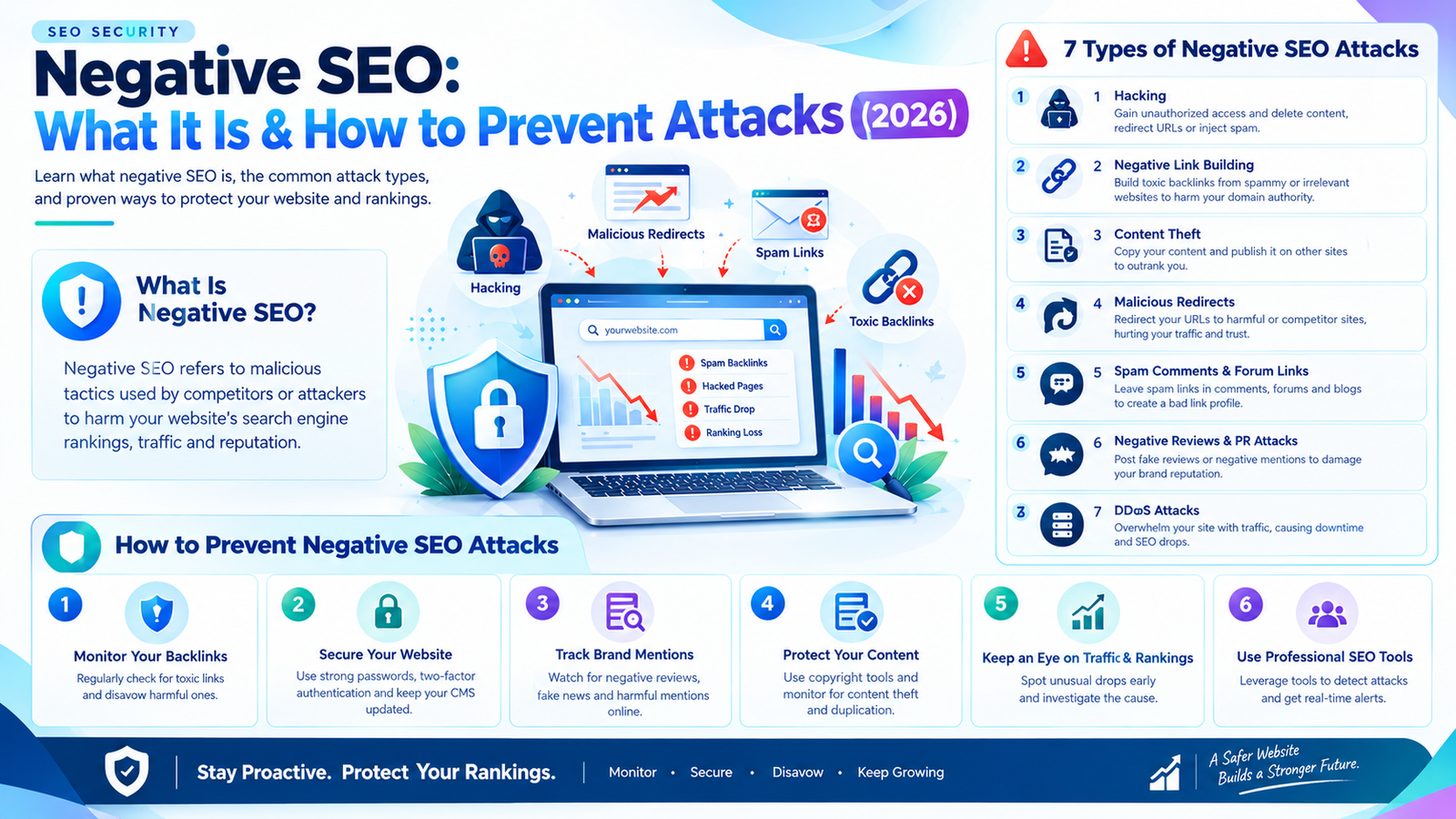
Imagine investing months in improving your website’s rankings, publishing high-quality content, and earning relevant backlinks, only to notice an unexpected decline in organic traffic. At the same time, you discover hundreds of suspicious backlinks, fake negative reviews, or copies of your original content appearing on unfamiliar websites.
Could your business be experiencing a negative SEO attack?
Negative SEO is a term used to describe attempts to damage a competitor’s search visibility, website reputation, or online presence through malicious or manipulative activities. These activities can include website hacking, spammy backlink campaigns, content theft, review manipulation, and impersonation.
However, an important distinction exists between a genuine attack and ordinary SEO fluctuations. A sudden ranking decline does not automatically mean someone is targeting your website. Algorithm updates, technical errors, changing search intent, stronger competitors, and content quality issues can produce similar symptoms.
In this guide, Digital Soules explains what negative SEO is, the seven most common types of negative SEO attacks, how to identify potential warning signs, and the practical steps businesses can take to protect their websites and online reputation.
What Is Negative SEO?
Negative SEO refers to deliberate actions intended to harm another website’s organic search performance, reputation, or ability to serve users.
Unlike traditional SEO, which aims to improve a website’s visibility through useful content, technical optimization, and legitimate authority building, negative SEO involves attempts to undermine a competing website.
Depending on the method used, an attack may target a website’s security, backlink profile, content, customer reviews, or brand reputation.
For example, a malicious individual might attempt to access a competitor’s website and insert spam pages, create large numbers of artificial backlinks pointing to the competitor’s domain, or impersonate the business to request the removal of legitimate backlinks.
These activities can create problems, but their effects vary significantly. Google has automated systems designed to identify and neutralize many forms of search spam, so suspicious activity does not necessarily lead to ranking losses. <sup>1</sup>
Is Negative SEO Really Possible?
Yes, some malicious activities can damage a website, particularly when they involve unauthorized access, malware, impersonation, or manipulation of its public reputation.
However, the idea that any competitor can easily destroy a website’s rankings by pointing thousands of spammy links at it is misleading.
Google’s documentation explains that its systems work to prevent actions on third-party websites from negatively affecting another website. Most site owners do not need to disavow backlinks simply because they look suspicious. <sup>2</sup>
The most useful approach is to distinguish between three situations:
- Direct website attacks: Unauthorized changes, malware, injected pages, or malicious redirects that require immediate attention.
- Reputation and content attacks: Fake reviews, impersonation, copied content, or false claims that require investigation and appropriate reporting.
- Suspicious SEO signals: Unusual backlinks, ranking fluctuations, or traffic declines that require analysis before any corrective action.
Understanding these differences helps businesses protect their websites without wasting resources on false alarms.
Types of Negative SEO
Negative SEO activities can take several forms, ranging from technical attacks to attempts to undermine a company’s credibility.
The following are seven common types of negative SEO attacks and the steps you can take to respond to them.
7 Types of Negative SEO Attacks
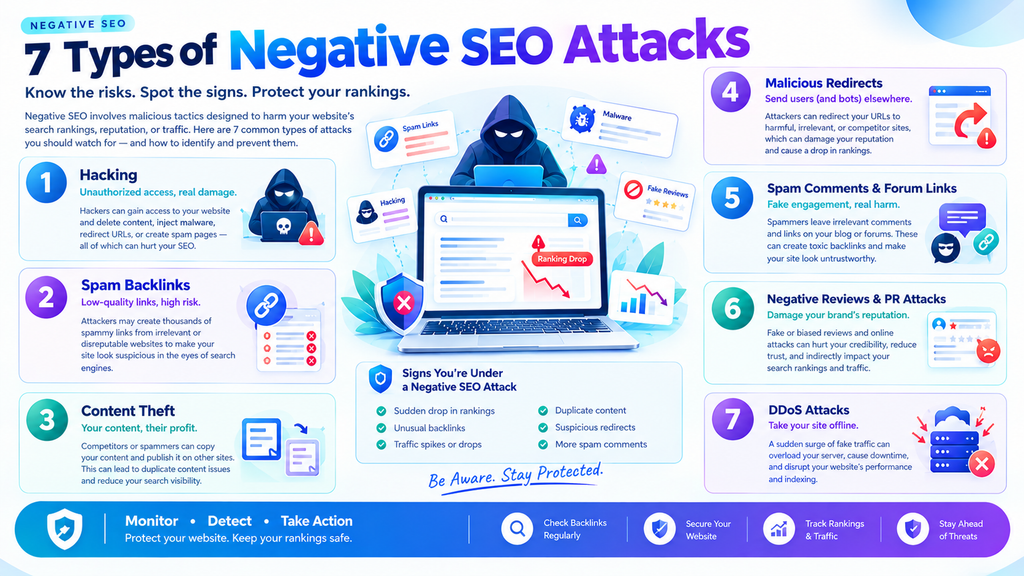
1. Website Hacking and Malicious Code Injection
Website hacking is one of the most serious security threats a business can face. If an attacker gains unauthorized access to your website, they may change its content, create spam pages, inject malicious code, or redirect visitors to harmful websites.
Google identifies several forms of hacked content, including code injection, page injection, content manipulation, and malicious redirects. Some attacks are designed to remain hidden from website owners while presenting different content to search engines or visitors. <sup>3</sup>
Warning signs of a hacked website
Watch for the following symptoms:
- Unknown pages appearing on your domain.
- Unexpected redirects to suspicious websites.
- Unfamiliar scripts or links appearing in your source code.
- Sudden changes to website files or administrative accounts.
- Security warnings in Google Search Console.
- Unexpected changes to important pages, titles, or metadata.
A decline in rankings alone is not proof of hacking. Investigate technical evidence before deciding that a security incident has occurred.
How to prevent website hacking
Use strong authentication. Require unique passwords and enable multifactor authentication for administrator accounts, hosting dashboards, and other important services.
Keep your website updated. Apply security updates to your content management system, plugins, themes, and server software. Remove components you no longer use.
Maintain reliable backups. Keep recent backups in a secure location separate from your live website and periodically test the restoration process.
Monitor security alerts. Review Google Search Console’s Security Issues report and use suitable website security tools to detect suspicious changes.
Investigate unfamiliar files and users. Review administrative accounts, file changes, scheduled tasks, and server logs when you suspect unauthorized access.
If your website is compromised, secure your hosting account, remove malicious code, patch the vulnerability, restore clean files where necessary, and follow Google’s hacked-site recovery guidance. Do not simply remove suspicious pages without investigating how they were created.
Official resource: Google’s guide to fixing hacked websites.
2. Malicious Backlink Building
Malicious backlink building involves creating suspicious or artificial links pointing to another website with the intention of damaging its SEO performance.
For example, an attacker might create automated links from irrelevant websites, spam-filled pages, or networks of low-quality domains.
These links may contain repetitive commercial anchor text, unrelated topics, or patterns that look unnatural.
However, a large number of suspicious backlinks does not automatically mean your website has been penalized. Google’s systems can ignore many unnatural links, and backlink tools cannot determine with certainty whether every questionable link is harmful.
How to identify suspicious backlink activity
Use Google Search Console’s Links report and a reputable backlink analysis tool to investigate unusual changes.
Look for patterns such as:
- A sudden, unexplained increase in referring domains.
- Repeated keyword-rich anchor text from unrelated websites.
- Links appearing across many pages of the same suspicious domain.
- Large groups of links with similar publication dates or patterns.
- Evidence that links were created through an artificial network.
These observations are clues for further investigation, not definitive proof of an attack.
Also consider whether a recent marketing campaign, legitimate press coverage, or a newly discovered backlink database explains the increase.
How to respond to malicious backlinks
Start by documenting the suspicious links and reviewing your Google Search Console notifications for any manual action related to unnatural links.
If the links are simply unsolicited and you have no manual action or evidence of a likely link-related manual action, you will generally not need to do anything.
If you have a substantial number of artificial or spammy links associated with a manual action—or believe they are likely to cause one—investigate whether the links can be removed. Google recommends using its disavow tool only in appropriate, serious situations because incorrect use can harm search performance. <sup>2</sup>
Avoid disavowing backlinks indiscriminately. A third-party tool’s toxicity score is not a Google penalty score.
3. Website Content Scraping and Plagiarism
Content scraping occurs when someone copies content from your website and republishes it elsewhere without authorization or meaningful transformation.
Scraped material can include blog articles, product descriptions, images, research, and other original resources.
For businesses that invest heavily in content marketing, plagiarism can create reputational problems and complicate efforts to establish the original source of information.
Nevertheless, duplicate content does not automatically result in a Google penalty. Google generally attempts to identify the most appropriate version of similar content to display in search results. The outcome depends on several factors, and copied content does not always outrank the original.
How to detect content scraping
Use a combination of manual searches and content monitoring.
You can:
- Search for distinctive sentences from your articles in quotation marks.
- Monitor important articles using plagiarism detection services.
- Check whether other websites reproduce your original images or research.
- Keep dated drafts, publication records, and original source files.
- Monitor whether suspicious copies appear in search results.
Focus on unauthorized copies that reproduce substantial portions of your work rather than ordinary quotations, properly attributed references, or permitted syndication.
How to protect your original content
First, document the copied material and record the URLs where it appears.
Next, contact the website owner or hosting provider and request removal when appropriate. If the issue involves copyright infringement, you can consider submitting a copyright removal request through the relevant platform or search engine.
Google provides a process for reporting eligible copyright complaints through its legal removal procedures. The availability and outcome of a request depend on the circumstances.
You should also strengthen the originality of your own content by including first-hand experience, original research, expert commentary, unique examples, and useful resources that are difficult to replicate.
Official resource: Google Search spam policies on scraping and copied content.
4. Negative SEO Through Fake Reviews
Fake negative reviews can undermine customer confidence, damage a company’s public reputation, and discourage prospective customers from making contact.
An attacker might create fabricated customer accounts, impersonate real customers, or coordinate a series of misleading reviews across business listing platforms.
Review manipulation is particularly concerning for businesses that depend on local visibility, including restaurants, clinics, professional services, home services, and local retailers.
However, not every negative review is malicious. Customers may have genuine complaints, and businesses should investigate feedback before requesting its removal.
How to recognize possible review manipulation
Potential warning signs include:
- Multiple reviews appearing within an unusually short period.
- Reviews from people who cannot be matched to any known interaction.
- Repeated or nearly identical wording across several reviews.
- Reviews describing services the business does not provide.
- A sudden pattern of suspicious reviews across multiple platforms.
None of these indicators proves fraud by itself. Some legitimate customers may post reviews around the same time, and genuine complaints can contain similar language.
How to respond to fake reviews
Document suspicious reviews, including their URLs, dates, and relevant details. Use the platform’s reporting process if a review appears to violate its policies.
For Google reviews, eligible businesses can report policy-violating reviews through their Google Business Profile and check the status of the report.
Avoid buying positive reviews, offering incentives for reviews in exchange for favorable ratings, or posting fake responses. These practices can create additional policy problems.
For legitimate negative feedback, respond professionally and offer an appropriate resolution. A calm, factual response can reassure prospective customers that your business takes customer concerns seriously.
Official resource: Google Maps user-generated content policies.
5. Brand Impersonation and Online Smear Campaigns
Brand impersonation and smear campaigns involve attempts to damage a company’s reputation through misleading statements, fake accounts, fabricated claims, or unauthorized use of its identity.
An attacker might create a fake social media profile, publish misleading information about a business, impersonate an employee, or contact customers while pretending to represent the company.
These activities may not directly change a website’s search rankings, but they can damage customer trust, create confusion, and affect the business’s online reputation.
How to detect brand impersonation
Monitor your brand name and important business terms across search engines, social platforms, and relevant industry communities.
Look for:
- Social profiles using your company’s name or branding without authorization.
- Fake websites presenting themselves as your official business.
- Misleading contact information or fraudulent offers.
- False statements that appear across several unrelated websites.
- Customer inquiries about communications your company never sent.
Brand monitoring services can help centralize mentions, but manual checks may still be necessary to verify context and authenticity.
How to protect your business reputation
Secure your official social accounts and domain registrar accounts with multifactor authentication. Maintain consistent business information on your website and legitimate profiles so customers can verify your identity.
Report impersonation to the relevant platform and document misleading claims before requesting removal. If the situation involves fraud, threats, or potentially defamatory statements, consider consulting a qualified legal professional.
Respond publicly when doing so will help clarify important facts, but avoid amplifying every malicious post unnecessarily.
The goal is to protect customers and preserve trust—not to treat every unfavorable opinion as an attack.
6. Attempts to Remove Valuable Backlinks
Not every negative SEO tactic involves creating bad links. In some cases, a malicious individual may attempt to remove legitimate backlinks that your website has earned.
For example, someone might contact a publisher while impersonating your company or SEO agency and falsely claim that a link should be removed.
If the publisher believes the request is legitimate, a valuable editorial link could disappear.
However, backlinks are frequently removed for ordinary reasons, including updated content, website redesigns, expired pages, and editorial decisions. A lost link does not automatically indicate malicious activity.
How to monitor lost backlinks
Use Google Search Console and an appropriate backlink monitoring tool to review your backlink profile.
Prioritize links from relevant publications, industry websites, trusted partners, and resources that refer meaningful traffic or support your brand authority.
When a valuable backlink disappears, investigate:
- Whether the original page still exists.
- Whether the link was removed during a website redesign.
- Whether the referring page changed its content or linking policy.
- Whether the publisher received an unusual removal request.
- Whether the link was removed intentionally or through a technical error.
How to recover lost backlinks
Contact the publisher through a verified contact address and politely ask whether the link can be restored.
If the publisher confirms that an unauthorized request caused the removal, clarify the situation and provide evidence that you control the website.
You can also maintain relationships with industry publishers and partners to reduce the likelihood of communication being misinterpreted.
Remember that website owners retain editorial control over their pages. Recovery is not guaranteed, and legitimate removal decisions should be respected.
7. Unauthorized Image Hotlinking and Bandwidth Abuse
Hotlinking occurs when another website embeds media hosted on your server instead of storing and serving its own copy.
For example, a website might display an image from your domain by linking directly to the original image URL.
Hotlinking is not inherently malicious. Some legitimate websites use externally hosted media with permission. Problems arise when unauthorized or excessive requests consume significant server resources or increase bandwidth costs.
In severe cases, excessive image requests can contribute to performance issues and make your website less responsive.
However, hotlinking should not automatically be considered a negative SEO attack. Many sites experience no meaningful SEO impact from ordinary image embedding.
How to identify hotlinking
Review your hosting analytics, bandwidth reports, server logs, and content delivery network dashboard for unusual patterns.
Look for:
- Unexpected increases in image requests.
- Large volumes of bandwidth consumption from unfamiliar sources.
- Repeated requests for specific media files.
- Performance problems that coincide with unusual resource usage.
Traffic from unfamiliar websites is not proof of abuse, so investigate the request patterns before blocking access.
How to prevent bandwidth abuse
If hotlinking is creating a genuine problem, consider configuring appropriate server rules, a content delivery network, or an image delivery service to restrict unauthorized use.
For Apache servers, a carefully configured .htaccess rule can restrict requests for selected file types based on the HTTP referrer. However, referrer headers can be absent or spoofed, so such rules are not a complete security solution and may block legitimate visitors if configured incorrectly.
Before making server configuration changes, create a backup and test the rules. If your website uses managed hosting, consult your hosting provider.
You can also optimize image sizes, configure caching, and monitor resource usage to improve overall website performance.
Important: Hotlink protection is primarily a resource-management measure. It should be implemented because there is a demonstrable bandwidth or security problem, not as a routine SEO tactic.
How to Tell Whether Your Website Is Experiencing a Negative SEO Attack
A sudden decline in rankings can be alarming, particularly when your business depends on organic search for leads and revenue.
Before assuming that an attack has occurred, investigate the available evidence systematically.
Step 1: Review Google Search Console
Start with your website’s Search Console performance data.
Compare recent clicks, impressions, average positions, and affected pages against an appropriate historical period.
Determine whether the decline affects your entire website, a particular group of pages, or only a small set of search queries.
Check the Security Issues and Manual Actions reports for relevant warnings.
Step 2: Investigate Technical Changes
Review recent website updates, plugin installations, server changes, redirects, indexing directives, and access logs.
Check whether important pages are returning the correct status codes, remain accessible to search engines, and have not been accidentally blocked or removed from the index.
If you discover unknown pages, scripts, or administrative accounts, investigate whether unauthorized access has occurred.
Step 3: Analyze Your Backlink Profile
Compare recent referring domains and lost backlinks with historical data.
Investigate unusual patterns, but avoid making decisions based exclusively on automated toxicity scores.
If no manual action or credible evidence of a serious link-related problem exists, a suspicious backlink increase alone is usually not sufficient reason to disavow links.
Step 4: Check for Content Theft and Reputation Issues
Search for distinctive excerpts from your most important content and monitor your brand name across relevant platforms.
If you discover copied articles, fake profiles, or suspicious reviews, document the evidence and use the appropriate reporting channels.
Step 5: Compare Your Findings With Other SEO Changes
Consider whether a Google ranking update, seasonal demand change, stronger competition, content decay, or website migration could explain the decline.
Use evidence from multiple sources before concluding that the problem is a deliberate attack.
How to Prevent Negative SEO Attacks: A Practical Checklist
Prevention is generally more effective than reacting to every suspicious signal after the fact.
Use the following checklist to establish a basic protection and monitoring process.
- Enable multifactor authentication for important accounts.
- Keep your CMS, themes, plugins, and server software updated.
- Maintain secure backups and test website recovery procedures.
- Review Google Search Console security and manual action reports.
- Monitor organic traffic, indexing, and technical SEO performance.
- Check backlink changes periodically using reliable data sources.
- Monitor important brand mentions and customer reviews.
- Keep records of original content, publication dates, and valuable backlinks.
- Restrict administrative access to trusted users.
- Establish a response plan for hacking, impersonation, and copyright complaints.
The appropriate monitoring frequency depends on your website’s size, business risk, and available resources. A high-traffic e-commerce site may need automated alerts and frequent security checks, while a small brochure website may be able to use a simpler routine.
What Should You Do If You Suspect a Negative SEO Attack?
If you find credible evidence of malicious activity, avoid making rushed changes to your website or backlink profile.
Instead, follow a structured response process.
1. Document the evidence. Save affected URLs, timestamps, screenshots, server logs, suspicious review links, and relevant Search Console notifications.
2. Identify the type of incident. Determine whether the issue involves a security compromise, backlink manipulation, copied content, review abuse, or brand impersonation.
3. Contain immediate risks. If your website has been hacked, secure affected accounts, restrict unauthorized access, and work with your hosting provider or security professional.
4. Use the appropriate reporting channel. Report policy-violating reviews, impersonation, copyright infringement, malware, or other abuse to the relevant platform or authority.
5. Make evidence-based SEO changes. Correct technical issues, recover legitimate links when possible, and use Google’s disavow tool only when its documented criteria apply.
6. Monitor recovery. Track technical health, organic performance, security alerts, and the resolution of reported incidents.
Recovery timelines vary depending on the nature of the incident. A technical issue may be resolved relatively quickly once corrected, while restoring search performance or addressing reputational harm may take longer.
Common Negative SEO Mistakes to Avoid
When businesses suspect an attack, fear can lead to decisions that create additional problems.
Avoid these common mistakes:
Disavowing every suspicious backlink. Google advises that most websites do not need the disavow tool. Using it incorrectly can harm search performance.
Assuming every ranking decline is malicious. Search algorithms, competition, technical errors, and changing demand can all affect performance.
Buying positive reviews to counter fake reviews. Fabricated reviews and review manipulation can violate platform policies and further damage trust.
Removing pages without investigating. Unknown URLs may indicate hacking, but removing them without fixing the underlying vulnerability can leave the problem unresolved.
Ignoring genuine customer complaints. A negative review may reveal a legitimate service issue. Investigate the facts before deciding how to respond.
Taking action without preserving evidence. Records of suspicious changes, communications, and affected URLs can help when working with hosting providers, platforms, or legal professionals.
Frequently Asked Questions About Negative SEO
What is negative SEO in simple terms?
Negative SEO is the deliberate use of malicious or manipulative tactics to try to damage another website’s search visibility, reputation, or online performance. Examples include hacking, artificial backlink campaigns, content theft, and fake reviews.
Can someone destroy my Google rankings with spammy backlinks?
There is no reliable basis for assuming that spammy backlinks alone will destroy your rankings. Google has systems designed to identify and neutralize many unnatural incoming links. Investigate credible evidence of a manual action or other SEO issues before taking corrective action.
How do I know if my website has been attacked?
Look for verifiable evidence such as unauthorized website changes, suspicious redirects, unknown administrator accounts, unexplained spam pages, coordinated fake reviews, or documented impersonation. A traffic decline by itself is not enough to establish that an attack occurred.
Should I disavow toxic backlinks?
Usually, no. Google’s official guidance recommends using the disavow tool cautiously, primarily when a site has a considerable number of artificial or low-quality links and those links have caused, or are likely to cause, a manual action. Automated toxicity scores alone are not sufficient justification.
Does copied content cause a Google penalty?
Copied content does not automatically cause a penalty. Search engines attempt to identify appropriate versions of similar content, but unauthorized copying can still create copyright, attribution, and reputation problems. Document the evidence and use appropriate removal procedures when necessary.
Can negative SEO damage a local business?
Yes. Malicious activities such as fake reviews, impersonation, website hacking, and fraudulent listings can harm customer trust and interfere with a business’s online presence. Regularly monitor your business profiles, secure your accounts, and report policy violations through the relevant platforms.
How often should I monitor my website for negative SEO?
At a minimum, review organic performance, security notifications, and customer feedback regularly. Use automated alerts for important technical changes and suspicious activity where appropriate. The ideal schedule depends on your website’s size, risk profile, and business requirements.
Final Thoughts: Protect Your Website With Evidence-Based SEO
Negative SEO is a legitimate concern, but not every suspicious link, negative review, or ranking decline signals a deliberate attack.
The most effective defense is a combination of strong website security, reliable monitoring, careful backlink analysis, original content, and responsible reputation management.
Businesses should prioritize verifiable threats, correct genuine technical problems, and use Google’s official reporting and disavow procedures appropriately. Avoid making drastic SEO changes based on fear or third-party toxicity scores alone.
If your business wants to strengthen its organic visibility and build a more resilient digital presence, explore the SEO and digital marketing resources available at Digital Soules.
A proactive, evidence-based approach can help you protect your website, maintain customer trust, and focus your SEO investment on sustainable business growth.



