
To see your followers on Snapchat, tap your Bitmoji or Story icon. Select View All under Friends & Followers, then open the Followers tab. This tab shows people who follow your Public Profile without being mutual friends.
The Followers tab only appears when your account has a Public Profile. Without a Public Profile, Snapchat normally shows the Friends and Following tabs instead. Snapchat confirms this layout in its official Friends and Followers guide.
Quick answer: Where can you find Snapchat followers?
| What you want to see | Where to look |
|---|---|
| People following you | Profile → View All under Friends & Followers → Followers |
| People you follow | Profile → View All under Friends & Followers → Following |
| Mutual Snapchat friends | Profile → View All under Friends & Followers → Friends |
| Your exact follower count | Public Profile → Insights → Audience |
| Your public follower count | Public Profile, if Show Follower Count is enabled |
| Someone else’s follower count | Their Public Profile, only when displayed publicly |
| Someone else’s full follower list | Snapchat does not provide access to it |
| People who viewed your public Story | Open the public Story Snap and swipe up |
What is the difference between friends, followers, and following on Snapchat?
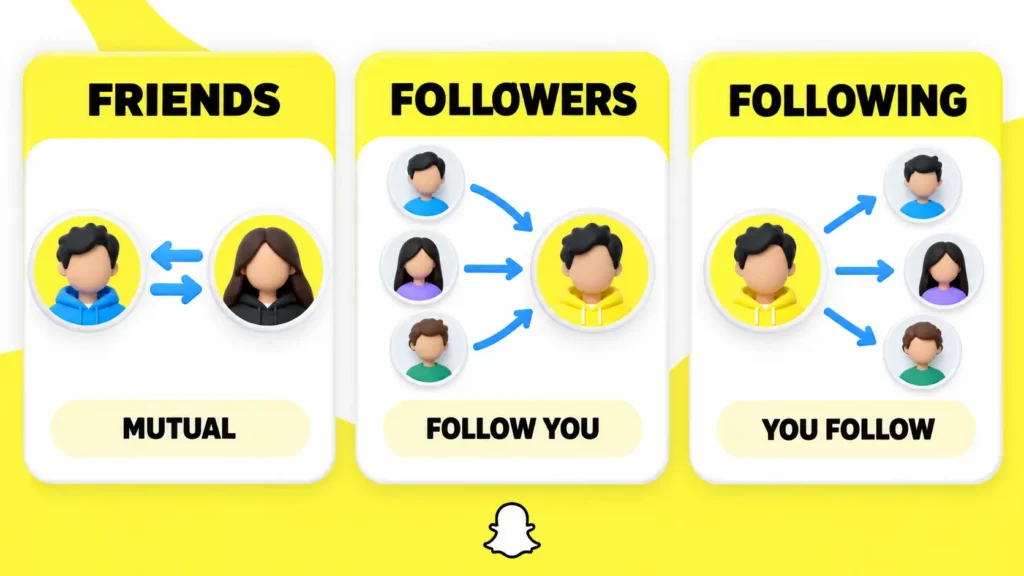
A Snapchat friend is someone you added who also added you back. A follower is someone who follows your Public Profile, but you have not added that person back. Following refers to accounts you follow, whether or not they follow you.
| Snapchat term | What it means |
|---|---|
| Friend | You have added each other |
| Follower | The person follows you, but you are not mutual friends |
| Following | You follow the account |
| Public Story viewer | Someone who watched your public Story, whether or not they follow you |
This distinction matters because your Friends list and Followers list are different. Someone can follow your public content without being allowed to view private Stories or contact you as a friend.
Some Snapchat screens and older support pages use the word subscriber instead of follower. Both terms generally describe the one-way audience connected to a Public Profile.
How to see your followers on Snapchat
You can see who follows you from the Friends & Followers section of your Snapchat profile.
- Open the Snapchat app.
- Tap your Bitmoji or Story icon in the top-left corner.
- Scroll to Friends & Followers.
- Tap View All.
- Select the Followers tab.
- Scroll through the list to see who follows your account.
The Friends tab contains mutual connections. The Following tab shows accounts you follow. The Followers tab contains people who follow your Public Profile.
How to see how many followers you have on Snapchat
The most reliable place to find your Snapchat follower count is the Audience section of Public Profile Insights.
- Open Snapchat and tap your profile icon.
- Select Public Profile.
- Open the Insights tab.
- Find the Audience section.
- Check the displayed follower total.
Snapchat states that Audience Insights shows how many followers you have. Accounts with more than 200 followers may also receive audience information such as age and gender breakdowns.
These details are private analytics. They are different from the follower number displayed publicly on your profile. See Snapchat’s Audience Insights guide.
Do not confuse your follower count with your Snap Score. A Snap Score reflects your Snapchat activity. It does not show how many friends or followers you have.
How to see how many followers I have on Snapchat without Insights
Open your Public Profile and look below your profile information. Snapchat may display your follower count there when the visibility setting is enabled.
If you cannot see the number, open your Public Profile editor and check the follower-count setting. The label may appear as Show Follower Count or Show How Many Follow Me, depending on your app version.
Insights is the better option when you need your private account total. The Public Profile number is designed for visitors and can be hidden.
How to see Public Profile followers on Snapchat
Your Public Profile followers appear in the Followers tab under Friends & Followers. Your total follower count also appears inside Public Profile Insights.
A Public Profile allows people to follow you without becoming friends. Followers can see content posted to My Story · Public. Content posted to My Story · Friends remains limited to friends.
Creating a Public Profile does not automatically make private Stories public. Snapchat keeps public publishing controls separate from your friend-only Story settings.
How to show your follower count on your Snapchat Public Profile
You can decide whether visitors can see your Snapchat follower count.
- Tap your Bitmoji or Story icon.
- Select Public Profile.
- Tap the pencil or Edit Profile icon.
- Turn on Show Follower Count.
Turn the same setting off when you want to hide the number. Hiding the public count does not remove followers or stop you from viewing your private audience data.
Snapchat provides the latest steps in its follower-count visibility guide.
How to see who your followers are on Snapchat
Open Profile → Friends & Followers → View All → Followers to see follower names. This is the clearest way to find out who follows you on Snapchat.
Someone who follows you may later become a friend. If you add that follower back, the relationship becomes mutual. The person can then move into your Friends list.
Recent friend requests and followers are not always identical. Use the Followers tab when you specifically want the audience connected to your Public Profile.
How to see all followers on Snapchat
Open the Followers tab and scroll through the available list. Snapchat does not require you to open each follower’s Public Profile separately.
If the Followers tab is missing, check these points:
- Confirm that Snapchat is updated.
- Check that your account has a Public Profile.
- Close and reopen Snapchat after updating it.
- Look for View All under Friends & Followers.
- Remember that accounts without a Public Profile only show Friends and Following.
Public Profiles are available to Snapchatters aged 16 or older in supported countries. Some features can vary by age, region, account type, and app version.
How to see non-followers on Snapchat
“Non-followers” can mean people who do not follow you back. It can also mean people who viewed your public content without following you. Snapchat handles these situations differently.
Find people who do not follow you back
Snapchat does not provide a dedicated Not Following Back list. You can manually compare your Following and Followers tabs:
- Open View All under Friends & Followers.
- Check the person’s name in your Following tab.
- Switch to the Followers tab.
- Look for the same account.
- If the account is absent, that person may not follow you back.
Avoid third-party unfollower apps that request your Snapchat password. They cannot legitimately unlock private follower information and may put your account at risk.
See non-followers who viewed your public Story
You can review people who watched an active public Story:
- Open your Public Story Snap.
- Swipe up to open Insights and Replies.
- Look under Viewers.
Snapchat says the viewer area can include friends, followers, and other Snapchatters. It shows who viewed that Story but does not create a permanent list of everyone who visited your profile.
See Snapchat’s public Story viewer guide for the current instructions.
How to see someone’s followers on Snapchat
You cannot see another person’s complete Snapchat follower list. Snapchat may show the person’s follower count on their Public Profile, but visitors cannot open the number and browse every follower.
This privacy limit still applies when the person is your friend. Friendship does not give you access to someone’s private audience list.
Websites promising to reveal private or hidden followers should be treated carefully. Never provide your Snapchat password, verification code, or recovery code to a follower-checking website.
How to see how many followers someone has on Snapchat
Open the person’s Public Profile and look for a follower count near their profile information. You can only see the number when the person has a Public Profile and has chosen to display it.
If no follower count appears, one of these explanations usually applies:
- The person does not have a Public Profile.
- The person has hidden the follower count.
- The feature is unavailable for that account or region.
- Snapchat is showing limited public information for the profile.
There is no official setting that lets you bypass a hidden count. A third-party checker may display public information, but it cannot legitimately reveal information Snapchat keeps private.
Can someone see that I checked their Snapchat follower count?
Snapchat does not provide a visitor list for people who simply open a Public Profile. The person may see your name if you watch their Story, reply, subscribe, add them, or take certain screenshots.
Reading a visible follower count and watching a Story are different actions. Public Story owners can review viewer information for active Stories.
Why is my Snapchat follower count different from my Story views?
Follower count and Story views measure different things. Your follower count represents the audience connected to your Public Profile. Story views show the performance of a particular Story.
A public Story can be watched by friends, followers, and other Snapchatters. One person may also watch more than one Snap. Therefore, Story views should not be used to estimate your follower count.
Use Public Profile Insights for accurate performance information. Snapchat provides separate metrics for viewers, Snap views, screenshots, replies, shares, and followers gained from Spotlight content in its analytics guide.
Why can I not see my followers on Snapchat?
The most common reason is that your account does not have an active Public Profile. Snapchat only adds the Followers tab when Public Profile follower features are available.
Try these solutions:
- Update Snapchat through your device’s app store.
- Restart the Snapchat app.
- Open your profile and look for Public Profile.
- Tap View All under Friends & Followers.
- Confirm that you selected Followers.
- Sign out only after confirming that your Memories are backed up.
If the feature remains missing, it may not be available for your account, age group, or region.
How can I protect my Snapchat follower privacy?
Turn off the follower-count setting when you do not want your number displayed publicly. You can still review your own total through Insights.
You should also check what you publish to My Story · Public. Public content can reach people outside your friend list.
Never use a follower tool that asks for your password or login verification code. A public-profile checker only needs publicly available profile information. It does not need access to your Snapchat account.
Frequently asked questions
How do I see my followers on Snapchat?
Tap your Bitmoji, select View All under Friends & Followers, and open the Followers tab. This tab appears when your account has a Public Profile.
How do I see how many followers I have on Snapchat?
Open your Public Profile, select Insights, and check the Audience section. This area displays your total number of followers.
Can I see everyone who follows me on Snapchat?
You can view your available follower list through Friends & Followers → View All → Followers. Snapchat does not let you see another person’s complete follower list.
Can I see who someone else follows on Snapchat?
Snapchat does not provide a public list of every account another person follows. You cannot view their complete Following list.
Can someone hide their Snapchat follower count?
Yes. Public Profile owners can turn Show Follower Count on or off. A hidden number cannot be revealed through Snapchat’s normal profile controls.
Are Snapchat followers the same as friends?
No. Friends have added each other. A follower has a one-way connection to a Public Profile.
Can I see who viewed my Snapchat profile?
Snapchat does not provide a general profile-visitor list. You can see viewers of an active Story, which is different from seeing everyone who opened your profile.
Final answer
To see your Snapchat followers, open your profile, tap View All under Friends & Followers, and select Followers. Use Public Profile → Insights → Audience when you need your follower count.
You can see another person’s follower count only when they display it publicly. Snapchat does not reveal their complete follower list.